

Riverside
Professional 4K remote recording meets AI-powered content repurposing.
What is Riverside?
Is This Tool Right For You?
Finding the right recording platform in 2026 depends entirely on your quality standards and how much you value your post-production time. Here is the breakdown:
- ✔ Professional Podcasters: If you need separate high-fidelity tracks for every guest to ensure the best possible edit, this is your gold standard.
- ✔ Marketing Teams: If you need to turn one long-form interview into ten social media clips in under five minutes, the AI automation here is a lifesaver.
- ✔ Webinar Hosts: If you want to host live sessions that don't look like a grainy 2010s video call, the 1080p streaming and lead capture tools are built for you.
- ✔ Remote Producers: If you need to control a guest's technical settings from halfway across the world, the Business-tier producer mode is essential.
- ✖ Casual Callers: If you just need to talk to a friend and don't care about recording quality, sticking to a free tool like Zoom or Google Meet is more efficient.
- ✖ Offline-Only Editors: If you prefer a traditional, manual editing workflow without any AI assistance, you might find the text-based editor's automation intrusive.
Quick Verdict
In 2026, Riverside remains the undisputed heavyweight champion for remote content creation. While many competitors have tried to bridge the gap, Riverside’s dual focus on local 4K recording and AI-driven repurposing makes it more than just a recording studio—it is a full-stack production house. The platform effectively solves the "unreliable internet" problem by recording locally on each participant's device and then uploading those files to the cloud. If you are serious about video or audio content and want a tool that grows with your audience, the Pro or Grow plans offer the best balance of features and fidelity. It is not the cheapest option on the market, but the time saved in post-production via Magic Clips and AI transcriptions pays for the subscription almost immediately.
What Riverside Does
Riverside is a browser-based and app-based recording studio designed to bypass the quality limitations of traditional video conferencing. Unlike standard tools that record the stream over the internet (which leads to glitches if the connection drops), Riverside records audio and video locally on each person's computer. These high-quality files are then uploaded progressively to the cloud during the session. The result is crystal-clear 4K video and 48kHz audio, regardless of how poor your guest's Wi-Fi might be.
Beyond recording, Riverside has evolved into an AI-first editing suite. It uses text-based editing, meaning you can edit your video by simply deleting words from the generated transcript. It also features a suite of tools for live streaming to multiple platforms simultaneously, hosting professional webinars with lead generation, and an AI "Magic Clips" engine that automatically identifies the most engaging moments of a recording to create vertical shorts for TikTok, Reels, and Shorts. It functions as a centralized hub for the entire content lifecycle: from the first take to the final social media post.
Key Strengths
- Local 4K Recording: The platform's primary strength is its ability to capture up to 4K video resolution and uncompressed audio locally. This ensures that even if a guest’s internet cuts out entirely, the recording remains perfect because it isn't dependent on the live stream's stability.
- AI-Powered Repurposing (Magic Clips): Riverside’s AI doesn't just record; it thinks. The Magic Clips feature analyzes your long-form content and automatically extracts the most viral-worthy segments, adds captions, and re-frames them for mobile viewing, saving hours of manual editing.
- Text-Based Video Editing: This is a game-changer for non-editors. You can search for specific phrases in your recording and delete them from the video by simply highlighting the text. It makes the editing process as easy as editing a Word document.
- Comprehensive AI Suite: From "Eye Contact" correction that makes it look like you're looking at the camera even when reading notes, to the automatic removal of filler words like "um" and "uh," the AI tools are designed to make amateur creators sound like seasoned professionals.
Real Use Cases
- Indie Podcaster Building a Brand: A solo creator uses the Pro plan to record remote interviews in 4K, using the teleprompter feature to stay on track and the AI Show Notes to generate descriptions for Spotify and Apple Podcasts instantly.
- Corporate Marketing Manager: A marketer at a mid-sized firm uses the Grow plan to multistream a product launch to LinkedIn and YouTube simultaneously, while using the "Omnichat" feature to manage questions from both audiences in one place.
- L&D Professional Creating Training: A Learning and Development specialist uses the Webinar tier to host internal training sessions, capturing lead data and using the "as-live" feature to replay sessions for different time zones while maintaining engagement.
- Agency Producer Managing Clients: An agency uses the Business plan's "Producer Mode" to jump into a recording session unnoticed, adjusting a client's gain and monitoring their frame rate without being seen on the final recording.
- Social Media Influencer: A creator uses the Magic Clips feature to take a 30-minute interview and instantly generate 10 high-impact vertical clips for their Instagram and TikTok feeds, complete with burned-in captions.
Best For
- High-End Content Creators: Those who refuse to compromise on video quality and need 4K resolution for YouTube or professional broadcasts.
- Remote Teams: Companies that need to record high-quality testimonials or internal comms without flying a film crew to every employee's home.
- Efficient Editors: People who want to spend more time creating and less time in Premiere Pro, thanks to text-based editing and AI clip generation.
- Webinar Hosts: Users who need a stable, branded environment for presentations that also allows for high-quality recording and repurposing later.
Who Should Look Elsewhere
- Zencastr Users: If you are strictly an audio-only podcaster and find Riverside's video-heavy interface overwhelming, Zencastr remains a viable, albeit less feature-rich, alternative for pure audio workflows.
- Zoom Traditionalists: If your only goal is a quick, low-stakes meeting where recording quality is irrelevant, the overhead and cost of Riverside are likely unnecessary.
- Budget-Constrained Beginners: While there is a free plan, the 720p cap and watermark mean serious creators will eventually need to pay. If you have zero budget, OBS (Open Broadcaster Software) is a free, though much steeper, learning curve.
Limitations
- Free Plan Restrictions: The free tier is quite limited, capping video at 720p and, most importantly, including a Riverside watermark on all exported content, making it unsuitable for professional use.
- Internet Dependency for Uploads: While the recording is local, you still need a stable (eventual) connection to upload those large 4K files to the Riverside servers. Guests with extremely slow upload speeds may have to keep their browser open for a long time after the call ends.
- Browser Resource Intensity: Because Riverside is doing heavy lifting (recording and uploading 4K video simultaneously), it can be taxing on older computers, occasionally causing fans to spin up or minor lag in the interface.
- Learning Curve for Advanced Features: While basic recording is simple, mastering the Producer Mode, Custom RTMP settings, and the full editing suite takes some dedicated time.
Pricing Overview
Riverside offers a tiered pricing structure designed to scale with your production needs. All paid plans offer a discount of approximately 20% when billed annually.
- Free Plan ($0/mo): Includes 2 hours of multi-track recording, 720p video quality, 44.1 kHz audio, and unlimited single-track recording. Note: All exports will have a Riverside watermark.
- Pro Plan ($29/mo or $24/mo billed annually): The most popular choice. It offers 15 hours of separate track downloads per month, 4K video, 48kHz audio, no watermarks, teleprompter access, and the full AI editing suite including Magic Clips and transcriptions.
- Grow Plan ($39/mo or $34/mo billed annually): Designed for live streamers. It includes 20 hours of track downloads, 1080p live streaming, multistreaming to unlimited destinations (YouTube, X, LinkedIn, etc.), and custom studio overlays.
- Webinar Plan ($99/mo or $79/mo billed annually): Focused on lead generation. Includes 25 hours of track downloads, support for up to 100 registrants, lead capture tools, HubSpot integration, and automated email reminders.
- Business Plan (Contact Sales): For large-scale production. Offers unlimited track downloads, up to 10,000 webinar registrants, producer mode, full remote control of guest settings, and custom frame rates (24, 25, 29.97 FPS).
Pricing last verified: April 2026.
Our Assessment
After evaluating Riverside's 2026 feature set, it is clear that they have moved far beyond being a "Zoom for podcasters." The platform has successfully integrated AI in a way that feels practical rather than gimmicky. The text-based editor is genuinely intuitive, and the Eye Contact AI is surprisingly realistic, solving one of the biggest issues in remote recording: people looking at their screens instead of the lens.
Value for money is highest in the Pro plan. For $24 a month (annually), the combination of 4K local recording and the Magic Clips tool replaces at least two other subscriptions (a recording tool and a social media clipping tool). The ease of use remains high; sending a link to a guest is as simple as any other meeting platform, and the "progressive upload" technology ensures that data loss is almost non-existent. While the Webinar and Grow plans are more niche, they offer a level of polish that DIY solutions lack. If your goal is to produce content that stands out in an increasingly crowded digital landscape, Riverside is the most robust tool for the job. It transforms the messy reality of remote recording into a streamlined, professional studio experience.
Top Alternatives
- SquadCast — Choose SquadCast when you want a platform that is deeply integrated with Descript for an even more advanced audio-first editing experience.
- Zencastr — Choose Zencastr if you prefer an all-in-one platform that includes built-in monetization and ad-insertion tools for your podcast.
- StreamYard — Choose StreamYard if your primary focus is live streaming with heavy on-screen graphics and audience engagement, and recording quality is secondary.
Frequently Asked Questions
Q: Does my guest need to create a Riverside account?
No, guests do not need to create an account or download any software to join a Riverside session. You simply send them a link, and they can join directly through their Chrome or Edge browser, or via the Riverside mobile app.
Q: What happens if my internet disconnects during a recording?
Because Riverside records locally on your device, the recording continues even if the internet drops. Once your connection is restored, the platform will resume uploading the data to the cloud. You should just keep your browser window open until the upload is 100% complete.
Q: Can I record in 4K on the Free plan?
No, the Free plan is capped at 720p video quality. To unlock 4K recording and downloads, you will need to upgrade to the Pro plan or higher.
Q: How does the Magic Clips feature work?
Magic Clips uses AI to scan your full recording for key moments, high-energy segments, or completed thoughts. It then automatically cuts these into vertical snippets, adds captions, and allows you to choose a layout suitable for social media platforms like TikTok.
Q: Is Riverside compatible with mobile devices?
Yes, Riverside has dedicated apps for both iOS and Android. This allows you or your guests to record high-quality local video and audio using the professional-grade cameras found on modern smartphones.
Last reviewed: April 2026. Features and pricing are subject to change — always verify on the official website.
Screenshots
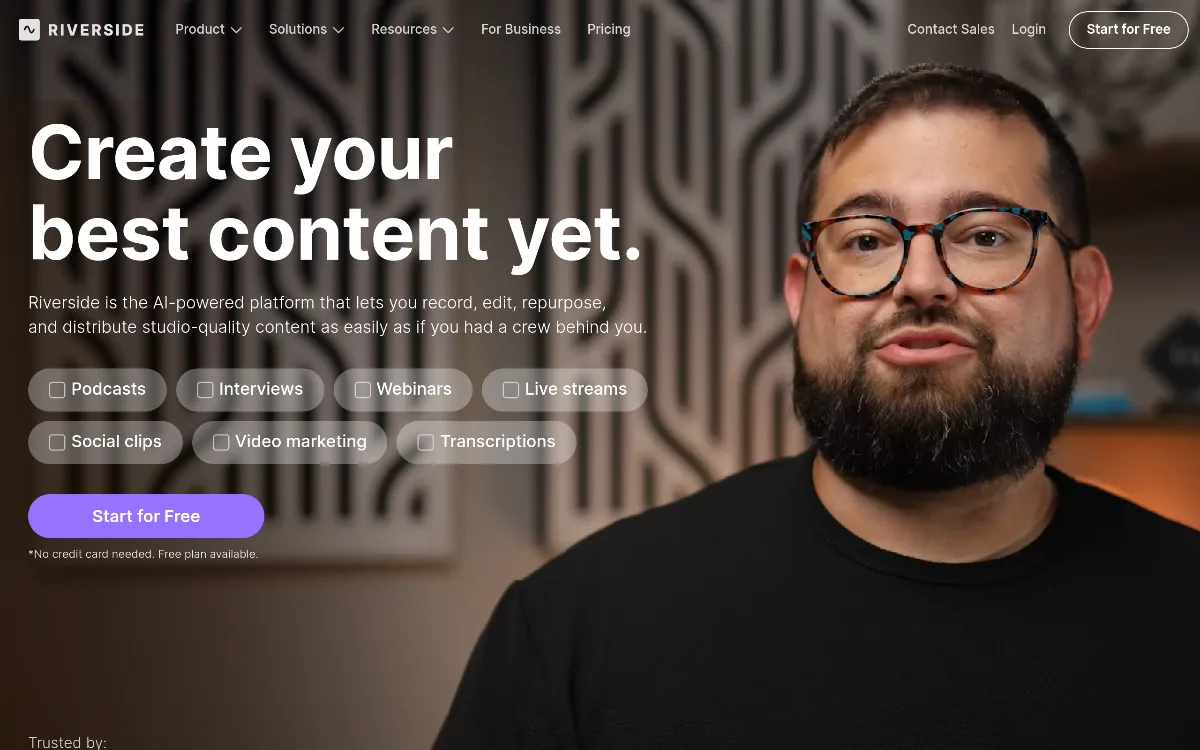 1/1
1/1Key Features
Pricing Plans
Free
$0/mo
Pro
$29/mo
Grow
$39/mo
Webinar
$99/mo
Business
Contact Sales
Top Riverside Alternatives & Competitors
Explore the best similar tools and how they compare.
The enterprise-grade standard for turning text into professional AI video.
The world's most advanced AI video agent for long-form content and cinematic ads.

The professional OS for AI video, now featuring Sora 2 Pro and Kling 3.0.
Record once, and Loom AI handles titles, summaries, chapters, and filler removal automatically.
Turn text into professional videos with iStock b-roll in just three clicks.
Edit video and audio like a document — transcript-based editing with AI voice cloning, captions, and studio-quality to
User Reviews
0 reviews · 0.0 avg rating
Be the first to review Riverside
Help the community by sharing your honest experience with this tool.
Write a Review