
Invideo
VerifiedThe world's most advanced AI video agent for long-form content and cinematic ads.
What is Invideo?
Is This Tool Right For You?
✔ You need to generate professional-grade videos (up to 30 minutes) from a single text prompt without manual editing.
✔ You want one-click access to the world’s most advanced video models like Sora 2, Kling 3, and Veo 3.1.
✔ You are a content creator or marketer who needs high-quality stock footage from iStock and Storyblocks integrated directly into your workflow.
✔ You require advanced AI features like voice cloning, digital avatars, and AI-driven color grading.
✖ You are looking for a completely free tool with no credit limitations; Invideo is a premium, credit-based ecosystem.
✖ You need a tool where unused credits roll over to the next month; Invideo has a strict 'use it or lose it' policy.
Quick Verdict
In 2026, Invideo has successfully transitioned from a simple template-based editor to a powerhouse AI video orchestrator. By integrating heavyweight models like OpenAI’s Sora 2 and Google’s Veo 3.1, it offers a level of cinematic output that was previously impossible for solo creators. The introduction of the Invideo v4 Agent is a game-changer, allowing for long-form content generation that actually makes sense. However, the pricing structure is complex and the credit-based system requires careful management. If you have the budget and need high-volume, high-quality video production, Invideo is currently the benchmark for AI-driven video creation.
What Invideo Does
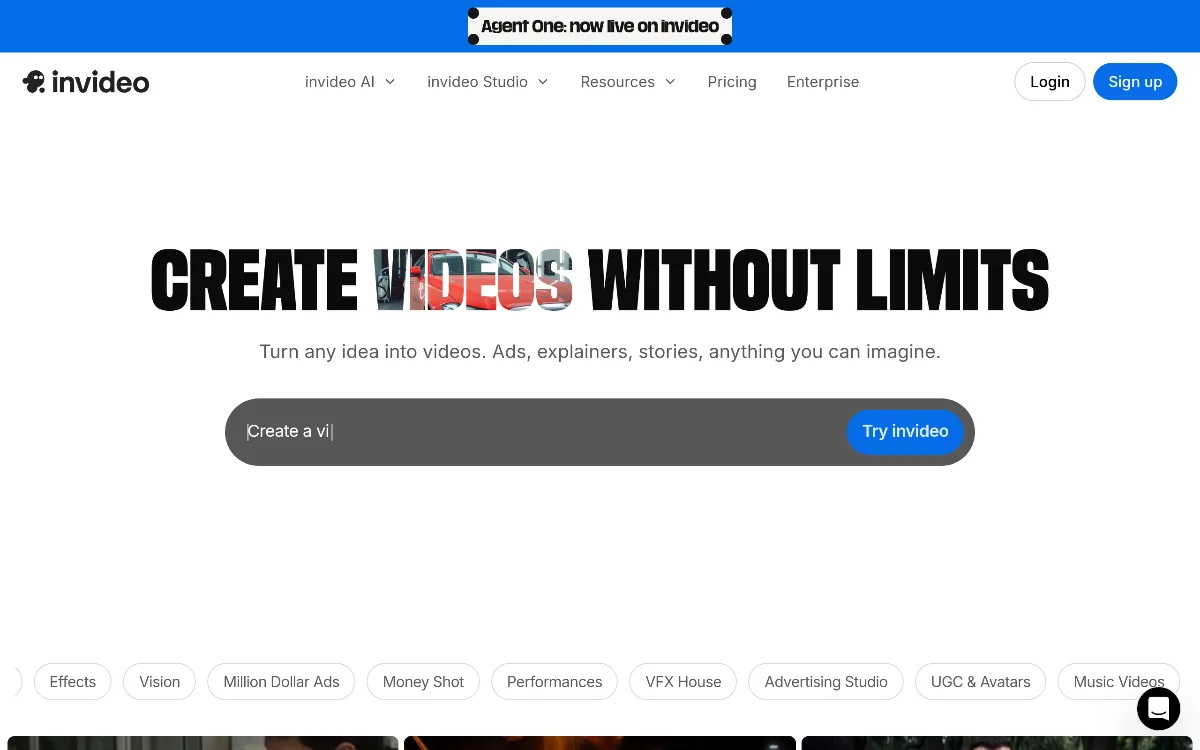
Invideo is an AI-native video production platform designed to automate the entire video creation pipeline. Unlike traditional editors that require you to drag and drop elements onto a timeline, Invideo uses a sophisticated "AI Agent" approach. You provide a prompt—ranging from a simple sentence to a detailed script—and the platform’s v4 Agent handles the heavy lifting. It scripts the content, selects relevant stock footage from a library of millions (including premium iStock assets), generates AI voiceovers, adds transitions, and applies background music.
The platform serves as a unified interface for multiple generative models. Instead of subscribing to five different AI services, Invideo users get access to a curated selection of the best models in the industry, including Sora 2, Kling 3, and Nano banana pro. This allows users to create everything from 15-second social media ads to 30-minute deep-dive explainer videos. Beyond just generation, Invideo provides a suite of AI-assisted editing tools like 'Prop Swap' for changing objects in a scene, 'AI Colorist' for cinematic grading, and 'Inpaint and Cleanup' for removing unwanted elements from footage.
Key Strengths
Multi-Model Orchestration: Invideo doesn't lock you into a single AI model. In 2026, it acts as a gateway to the industry's leading engines, including Veo 3.1, Sora 2, and Kling 3. This ensures that your videos always benefit from the latest advancements in generative video technology without needing to switch platforms.
The v4 AI Agent: The standout feature is the ability to generate up to 30 minutes of coherent video from a single prompt. This isn't just a montage of clips; the agent understands narrative structure, pacing, and context, making it ideal for YouTube creators and documentary-style content.
Premium Stock Integration: While many AI tools rely on mediocre open-source assets, Invideo provides direct access to high-end providers like iStock and Storyblocks. Even on the base 'Plus' plan, you get 100 iStock credits, which significantly elevates the visual quality of the final product.
Advanced Personalization: With support for up to 200 AI avatars and sophisticated voice cloning, brands can create personalized content at scale. This allows for the creation of localized marketing campaigns where the 'presenter' speaks multiple languages with the same voice and persona.
Real Use Cases
YouTube Content Creator: A solo creator can use the v4 Agent to turn a 2,000-word blog post into a 15-minute narrated video with relevant B-roll and subtitles in under ten minutes.
Social Media Manager: A marketing professional running multiple brand accounts can use the 'AI Video Trends' feature to quickly generate viral-style shorts and reels that match current platform aesthetics.
Corporate Trainer: An HR manager can utilize AI avatars and voice clones to create consistent training modules for global employees, ensuring the 'instructor' looks and sounds the same across 20 different languages.
E-commerce Founder: A small business owner can use the 'Prop Swap' and 'Relight' features to take a basic product video and transform it into a high-end luxury ad without hiring a production crew.
Real Estate Agent: Using the 'Virtual Production' and '3D Texturizer' tools, agents can create immersive property tours and neighborhood walkthroughs from simple photos and descriptions.
Best For
- High-Volume Content Studios: Teams that need to pump out dozens of videos weekly will find the 'Elite' plan’s 4,250 credits and 20x concurrency essential.
- Solo Entrepreneurs: The 'Plus' plan offers a cost-effective way to access premium AI models like Sora 2 without the enterprise price tag.
- Global Marketing Teams: Those who need to localize content quickly using AI avatars and voice cloning across multiple regions.
- Educational Content Producers: Creators who focus on long-form explainers where script-to-video accuracy is paramount.
Who Should Look Elsewhere
- Casual Hobbyists: If you only make one video a month, the $17/mo starting price and the 'no rollover' credit policy might feel like a waste of money. Consider a tool with a pay-as-you-go model.
- Professional Film Editors: If you need frame-by-frame manual control and work primarily in software like Premiere Pro or DaVinci Resolve, Invideo’s automation-first approach might feel restrictive.
- Budget-Constrained Users: Since credits expire at the end of the month, users who cannot guarantee a consistent production schedule may find more value in tools like Canva or CapCut for basic needs.
Limitations
Strict Credit Expiration: One of the biggest pain points is that unused credits do not roll over to the next month. If you don't use your 75 or 390 credits by the billing date, they are gone forever.
Variable Credit Costs: Not all video generations cost the same. High-end models like Sora 2 or Kling 3 consume credits at different rates, and Invideo reserves the right to change these costs without prior notice, making long-term budgeting difficult.
Concurrency Caps: Lower-tier plans like the 'Plus' plan have limited concurrency, meaning you can't render multiple high-end videos simultaneously, which can slow down urgent workflows.
No 'Forever Free' Tier: While there are options for exploring, the platform is heavily geared towards paid subscribers, and the best features (like watermark-free exports) are locked behind the paywall.
Pricing Overview
Invideo's 2026 pricing is structured around monthly credit allocations, with significant discounts for annual billing. Here is the breakdown:
Plus Plan: $17/mo (billed $200 yearly). Includes 75 credits/mo, access to all AI models (Sora 2, Kling 3, etc.), 4 AI avatars, 20 GB storage, and 100 iStock assets. Best for individuals exploring AI video.
Max Plan: $85/mo (billed $1000 yearly). Includes 390 credits/mo, 16 AI avatars, 100 GB storage, 200 iStock assets, and 2x more concurrency than the Plus plan. Designed for occasional professional use.
Generative Plan: $170/mo (billed $2000 yearly). Includes 800 credits/mo, 40 AI avatars, 2 TB storage, 1000 iStock assets, and 10x more concurrency. This is the 'Best Value' tier for daily creators.
Elite Plan: $900/mo (billed $10,800 yearly). Includes 4250 credits/mo, 200 AI avatars, 10 TB storage, 5000 iStock assets, and 20x concurrency. Aimed at power creators and agencies.
All paid plans include unlimited watermark-free exports and access to the Invideo v4 Agent. On-demand credit top-ups are available if you run out mid-month.
Pricing last verified: October 2026.
Our Assessment
Evaluating Invideo in 2026 reveals a platform that has successfully navigated the "AI transition" better than almost any other editor. The sheer depth of the feature set is staggering. What impressed us most during our assessment was the seamless integration of external models. You aren't just getting "Invideo AI"; you're getting a curated dashboard for the entire generative video industry. The v4 Agent's ability to handle 30-minute scripts is no small feat—it manages to maintain visual consistency and narrative flow in a way that previous versions struggled with.
However, the value for money is highly dependent on your usage volume. Because credits don't roll over, you are essentially paying for a "use it or lose it" subscription. For a professional agency, this is just a cost of doing business, but for a freelancer with an inconsistent schedule, it can be frustrating. The UI is clean, and the ease of use remains top-tier—you can literally go from an idea to a 4K render without touching a timeline. If you are serious about video content in 2026, Invideo provides the most comprehensive toolkit available, provided you can stomach the premium pricing and manage your credit burn effectively.
Top Alternatives
HeyGen — Choose HeyGen when your primary focus is on high-fidelity AI avatars and personalized video messaging for sales.
Runway — Choose Runway when you need more granular, artistic control over generative video frames and experimental AI tools.
Synthesia — Choose Synthesia if your main requirement is corporate training and internal communications using talking-head avatars.
Frequently Asked Questions
Q: Do my unused Invideo credits roll over to the next month?
No. According to Invideo's current 2026 policy, unused credits expire at the end of each billing cycle and do not roll over. It is important to plan your production schedule to maximize your monthly allocation.
Q: Can I create long-form videos with Invideo AI?
Yes. The Invideo v4 Agent is specifically designed to handle long-form content, allowing users to generate up to 30 minutes of video from a single prompt, complete with script, media, and voiceovers.
Q: Which AI models does Invideo use?
Invideo provides access to over 200 image, video, and audio models. This includes industry leaders like OpenAI's Sora 2, Google's Veo 3.1, Kling 3.0, and Elevenlabs for high-quality music and voice synthesis.
Q: Is iStock footage included in the subscription?
Yes, all paid plans include a specific number of iStock assets per month. The Plus plan starts with 100 iStock assets, while the Elite plan offers up to 5,000 per month.
Q: Can I remove the watermark on the free or exploratory versions?
Unlimited exports without watermarks are a feature of the paid plans (Plus, Max, Generative, and Elite). To remove watermarks and access premium exports, a paid subscription is required.
Last reviewed: October 2026. Features and pricing are subject to change — always verify on the official website.
Screenshots
 1/1
1/1Key Features
Pricing Plans
Plus
$17/mo
Max
$85/mo
Generative
$170/mo
Elite
$900/mo
Top Invideo Alternatives & Competitors
Explore the best similar tools and how they compare.
The enterprise-grade standard for turning text into professional AI video.

The professional OS for AI video, now featuring Sora 2 Pro and Kling 3.0.
Record once, and Loom AI handles titles, summaries, chapters, and filler removal automatically.
Turn text into professional videos with iStock b-roll in just three clicks.
Edit video and audio like a document — transcript-based editing with AI voice cloning, captions, and studio-quality to
Turn scripts into cinematic AI videos with the world's most realistic digital twins.
User Reviews
0 reviews · 0.0 avg rating
Be the first to review Invideo
Help the community by sharing your honest experience with this tool.
Write a Review