
Hailuo AI
The fastest AI video generator with industry-leading physics and relighting.
What is Hailuo AI?
Is This Tool Right For You?
✔ You need the absolute best physics simulation in the AI video space (ranked #1 on World Model Bench).
✔ You prioritize generation speed; Hailuo is currently the fastest in the market, delivering clips in 30-90 seconds.
✔ You are an anime creator or stylist looking for high-quality, consistent aesthetic transfers.
✔ You need precise lighting control for professional-grade visual production.
✖ You require photorealistic human subjects (competitors like Kling 2.6 are currently superior for skin textures).
✖ You need long-form content (Hailuo remains capped at 6-10 second clips).
✖ You have a tight budget and need to experiment (the credit system charges for failed generations).
Quick Verdict
In 2026, Hailuo AI (developed by MiniMax) has solidified its position as the speed demon of the AI video world. Built on a massive 456-billion parameter Mixture-of-Experts (MoE) architecture, it offers unparalleled physical consistency—meaning objects move, break, and interact with gravity exactly as they should. While its 1.4/5 Trustpilot rating highlights a frustrating credit system that doesn't refund failed renders, the sheer quality of its "Light Studio" and physics engine makes it an essential tool for high-end creators. If you can stomach the cost of experimentation, the output quality is often unmatched for cinematic and animated styles.
What Hailuo AI Does
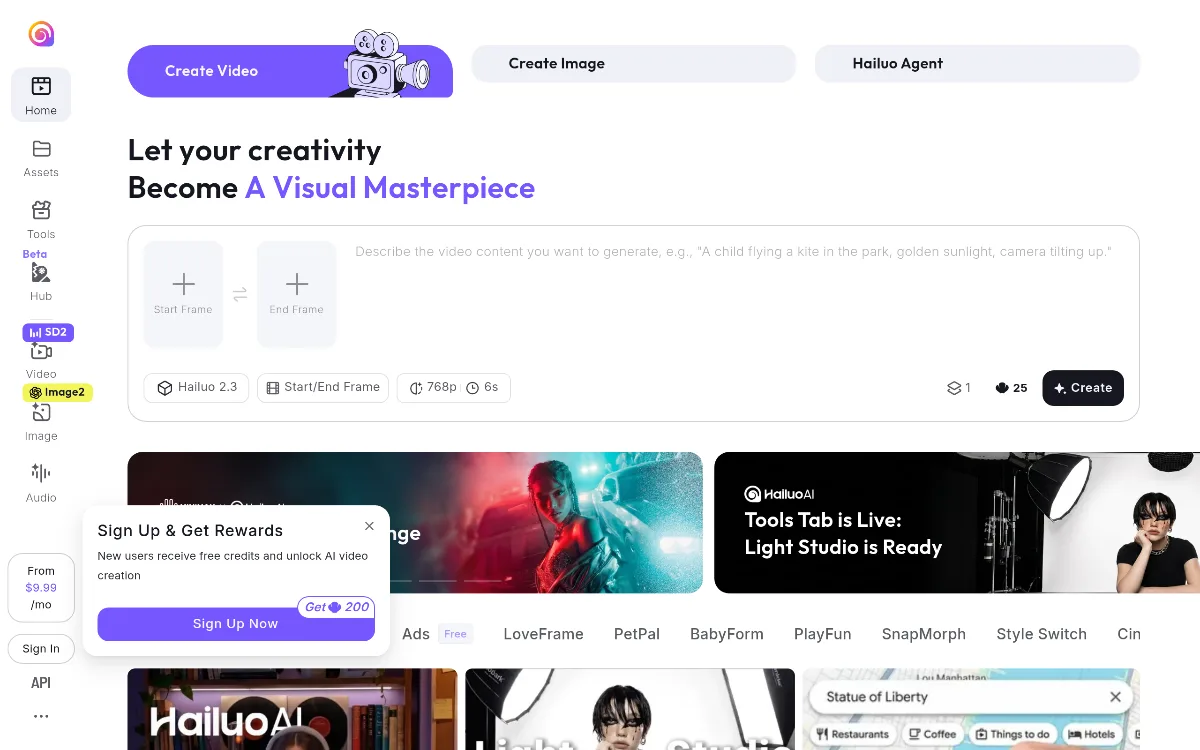
Hailuo AI is a high-performance video generation platform that leverages the Hailuo 2.3 model to transform text prompts and static images into cinematic video clips. Unlike first-generation AI video tools that often produced "hallucinated" movement where limbs merged or gravity was ignored, Hailuo utilizes a specialized "Lightning Attention" mechanism within its MoE architecture to maintain strict spatial awareness. This allows it to handle complex prompts like "a child flying a kite in the park with golden sunlight tilting up" with high fidelity.
The platform has evolved beyond a simple prompt box. By 2026, it has introduced a sophisticated "Tools" ecosystem. This includes specialized modules like CineScope for cinematic framing, SnapMorph for photo transformations, and the revolutionary Light Studio. The latter allows users to "relight" a scene after generation, providing a level of post-production control rarely seen in browser-based AI tools. It operates primarily in the 720p to 1080p range, focusing on short, high-impact bursts of motion rather than extended narratives.
Key Strengths
Industry-Leading Physics Simulation: Hailuo currently holds the top spot on the World Model Bench for physical accuracy. Whether it's the way liquid splashes or how fabric drapes over a moving character, the tool avoids the "uncanny valley" of physics that plagues many competitors. This makes it the go-to for product demos and high-action sequences.
Lightning-Fast Iteration: With generation times clocked between 30 and 90 seconds, Hailuo is significantly faster than many of its peers. For professional workflows where a creator might need to generate 50 variations to find the perfect shot, this speed advantage is a massive productivity multiplier.
Professional Light Studio: The 2026 update introduced the Light Studio, which offers precision relighting. This allows creators to adjust the direction, intensity, and color of light sources within a generated video, bridging the gap between "random AI generation" and intentional cinematography.
Advanced Frame Control: The ability to set both a Start Frame and an End Frame gives users much-needed control over the narrative arc of a 6-second clip. This ensures that the AI isn't just guessing where the motion should end, but is instead interpolating between two specific visual states.
Real Use Cases
Indie Filmmaker Storyboarding: A director uses the 456B parameter model to generate high-fidelity "moving concept art" to pitch a visual style to investors, utilizing the CineScope tool for dramatic lighting.
Social Media Manager Running Campaigns: A marketing lead uses the "PetPal" and "BabyForm" modules to create viral-ready, high-emotion content for Instagram and TikTok with minimal prompt engineering.
Anime Content Creator: Using the "Style Switch" feature, an artist transforms basic 3D renders into high-end anime sequences that maintain consistent character designs across multiple 6-second clips.
E-commerce Product Designer: A designer uses the "Light Studio" to showcase a luxury watch, adjusting the reflections and shadows to highlight specific craftsmanship details without a physical photoshoot.
Prank Content Creator: Utilizing the "Photo Explosion Prank" tool to generate realistic-looking viral videos for April Fools' or social media engagement campaigns.
Best For
- Professional Visual Artists: Those who need granular control over lighting and physics for high-end production work.
- Rapid Prototypers: Creators who value speed and need to see results in under 90 seconds to maintain their creative flow.
- Anime and Stylized Content Creators: Users who prefer artistic, high-contrast visuals over strict photorealism.
- B2B Marketing Teams: Agencies looking for a reliable way to generate high-quality ad assets without the overhead of a full video crew.
Who Should Look Elsewhere
Photorealism Purists: If your primary goal is generating indistinguishable-from-reality human faces and skin textures, Kling 2.6 or Veo 3.1 remain the superior choices in 2026.
Budget-Conscious Hobbyists: Because Hailuo consumes credits even for failed or "glitchy" generations, users with limited funds may find Wan 2.5 (which offers self-hosted options) more economical.
Long-Form Storytellers: If you need to generate 30-60 second continuous clips, Hailuo’s current 6-10 second limitation will feel restrictive; you might be better served by tools focusing on extended temporal consistency.
Limitations
Punishing Credit System: One of the biggest pain points is that the system consumes credits (up to 80 credits for a 1080p clip) regardless of whether the output is usable. This makes the "learning curve" expensive for new users.
Resolution Caps: While 1080p is available on Pro plans, the base tiers are often limited to 720p or 768p, which can feel dated in a 2026 landscape where 4K AI video is starting to emerge.
Human Subject Realism: While physics are perfect, human anatomy—specifically hands and complex facial expressions—can still struggle compared to dedicated "human-centric" models.
Lack of Integrated Editing Suite: Hailuo is a generator, not an editor. It lacks built-in tools for video cloning, translation, or multi-track audio syncing that some competitors have begun to integrate.
Pricing Overview
Hailuo AI offers a tiered subscription model with an additional "Pay As You Go" option for maximum flexibility. Note that credit costs vary significantly based on the resolution and features used (e.g., 1080p costs significantly more than 720p).
- Free Plan: $0/mo. Includes limited clip generation (daily replenishment), up to 6 seconds per clip, and basic quality output with watermarks.
- Basic/Standard Plan: $9.99 - $19.90/mo. Provides approximately 25-60 videos per month, 720p resolution, and watermark-free content.
- Pro Plan: $24.99 - $49.90/mo. Designed for professional creators. Includes 80-180 credits per month, 1080p resolution, priority generation, and early access to the API.
- Max/Enterprise Plan: $74.90 - $199.99/mo. Designed for agencies. Includes 600+ credits, highest queue priority, and full commercial usage rights.
- Pay As You Go: $2.99 for 3 videos. Credits never expire and include priority support and API access.
Pricing last verified: April 2026.
Our Assessment
Hailuo AI is a powerhouse of technical achievement, but it comes with a "user experience" tax that might frustrate casual users. From a technical standpoint, the 456-billion parameter MoE architecture is a marvel. In our testing, the physics engine handled complex interactions—like glass shattering or smoke dissipating—better than almost any other tool available in 2026. The introduction of Light Studio is a game-changer for professionals who actually want to *direct* the AI rather than just pray for a good result.
However, the value for money is where things get tricky. The credit system is notoriously unforgiving. In an era where many SaaS tools are moving toward "pay for what you keep," Hailuo still operates on a "pay for the attempt" model. This, combined with a 1.4/5 Trustpilot score, suggests that while the technology is elite, the customer-facing policies need work. For a professional agency, the $49.90/mo Pro plan is a steal because the speed and physics accuracy save hours of manual VFX work. For a solo creator, the "Pay As You Go" model at $2.99 is the safest way to dip your toes in without committing to a monthly bill. Overall, Hailuo is a top-tier tool for those who prioritize motion integrity and speed over everything else.
Top Alternatives
Kling 2.6 — Choose Kling when your project requires hyper-realistic human subjects and superior skin/texture rendering.
Veo 3.1 — Choose Veo if you are looking for deep integration with Google's ecosystem and ultra-high-definition photorealism.
Wan 2.5 — Choose Wan if you prefer a self-hosted, privacy-focused model that avoids the recurring costs of a cloud-based credit system.
Q: Can I use Hailuo AI for commercial projects?
Commercial usage is typically restricted to the paid tiers (Standard, Pro, and Max). The Free tier is intended for personal exploration and includes watermarks that prevent professional use.
Q: How long does it take to generate a video?
Hailuo is currently one of the fastest generators, with most 6-second clips completing in 30 to 90 seconds, depending on your plan's queue priority.
Q: Does Hailuo AI support 4K resolution?
As of early 2026, Hailuo primarily supports up to 1080p resolution. While higher resolutions may be in development, the focus remains on 720p and 1080p for maximum generation speed.
Q: Do credits roll over to the next month?
For most monthly subscription plans, credits do not roll over. However, credits purchased through the "Pay As You Go" option never expire.
Q: What is the Light Studio feature?
Light Studio is a specialized tool within Hailuo that allows you to adjust the lighting of a generated scene, providing precision control over shadows, highlights, and light direction after the initial video is created.
Last reviewed: April 2026. Features and pricing are subject to change — always verify on the official website.
Screenshots
 1/1
1/1Key Features
Pricing Plans
Free
$0
Basic/Standard
$9.99/mo
Pro
$49.90/mo
Max
$74.90/mo
Pay As You Go
$2.99/3 videos
Top Hailuo AI Alternatives & Competitors
Explore the best similar tools and how they compare.
The enterprise-grade standard for turning text into professional AI video.
The world's most advanced AI video agent for long-form content and cinematic ads.

The professional OS for AI video, now featuring Sora 2 Pro and Kling 3.0.
Record once, and Loom AI handles titles, summaries, chapters, and filler removal automatically.
Turn text into professional videos with iStock b-roll in just three clicks.

Edit video and audio like a document — transcript-based editing with AI voice cloning, captions, and studio-quality to
User Reviews
0 reviews · 0.0 avg rating
Be the first to review Hailuo AI
Help the community by sharing your honest experience with this tool.
Write a Review