

Cursor
The AI-native code editor that builds software while you 'vibe.'
What is Cursor?
Is This Tool Right For You?
✅ You are a developer who wants an AI that understands your entire codebase, not just the file you are currently editing.
✅ You want to leverage 'agentic coding' where the AI can execute terminal commands, search files, and run code in sandboxes autonomously.
✅ You prefer the VS Code ecosystem but want AI features built into the core architecture rather than added as a clunky plugin.
✅ You are ready to move beyond simple chat and into 'vibe coding' where you describe features and let the AI handle the boilerplate.
❌ You are on a zero-budget and expect unlimited high-end model access (the free tier is very restrictive).
❌ You work in a highly air-gapped or restricted environment where cloud-based AI processing is strictly forbidden by policy.
Quick Verdict
In 2026, Cursor is no longer just a 'VS Code fork'—it is the definitive AI-native development environment. With a staggering $1 billion in annualized revenue and over 2 million users, it has fundamentally changed how software is built. The introduction of Subagents and the 2026 'Canvas' update allows developers to move from writing lines of code to managing autonomous agents that build entire features. While the $20/month Pro plan remains the sweet spot for most, the new Ultra and Pro+ tiers cater to the 'heavy vibes' crowd who need massive model throughput. If you are still using a standard IDE with a basic plugin, you are likely working twice as hard for half the output. Cursor is the gold standard for developer productivity in 2026.
What Cursor Does
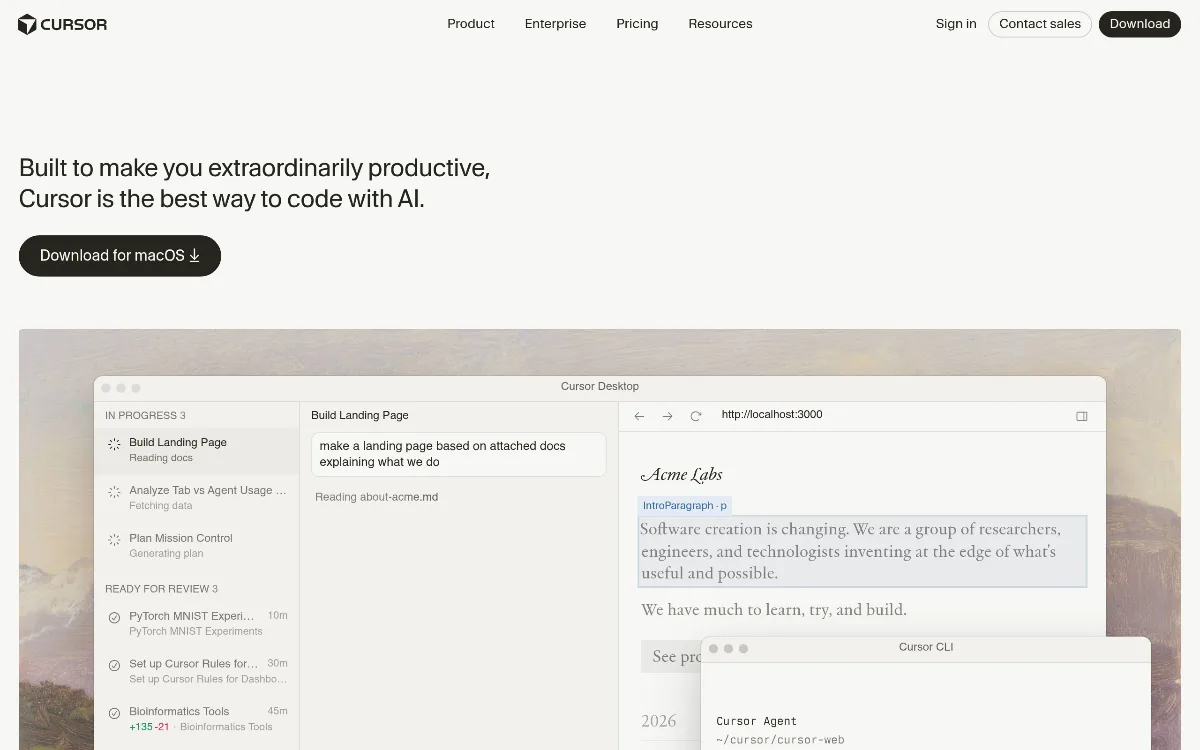
Cursor is an AI-powered Integrated Development Environment (IDE) that was originally forked from Visual Studio Code. This means it maintains 100% compatibility with your existing VS Code extensions and themes while re-engineering the editor's core to be AI-first. Instead of just having a chat window on the side, Cursor indexes your entire local repository. It 'sees' your folder structure, your documentation, and your library dependencies. In 2026, its capabilities have expanded into 'Agentic Coding.' Through features like Composer 1.5 and Subagents, Cursor doesn't just suggest code; it can proactively create new files, refactor existing ones across multiple directories, run terminal commands to install dependencies, and even debug its own errors by reading the stack trace. It supports all 'frontier' models, including the latest from OpenAI, Anthropic, and Google, giving you the flexibility to switch intelligence levels based on the complexity of the task at hand.
Key Strengths
Deep Codebase Context: Unlike standard plugins that only see the active file, Cursor indexes your entire project. When you ask a question or give a command, it uses RAG (Retrieval-Augmented Generation) to pull in relevant snippets from across your repository, ensuring the AI's suggestions actually work with your existing architecture.
Agentic Workflow (Subagents): New for 2026, the Subagents feature allows a 'parent' agent to delegate tasks to specialized 'child' agents. For example, one subagent can research a library while another writes the implementation and a third handles the CSS, all running in parallel to speed up feature delivery.
Composer 1.5 & Multi-File Editing: The Composer interface allows you to describe a high-level change (e.g., 'Add a stripe checkout flow') and the AI will simultaneously edit 5-10 different files, handling the frontend, backend, and types in one go with a high-fidelity diff view for you to review.
Cloud-Native Automations: With the 2026 Automations update, Cursor can now run agents in cloud sandboxes triggered by external events like a Slack message or a GitHub issue, allowing for always-on maintenance and autonomous bug fixing.
Real Use Cases
Indie Developer Shipping Features: A solo founder uses Cursor to 'vibe code' a new dashboard. They describe the UI in natural language, and Cursor uses its 'Canvas' feature to generate interactive visualizations and the underlying React code simultaneously.
Marketing Team Running Campaigns: A growth engineer uses the Slack-triggered Automations to have an agent automatically update landing page copy and deployment scripts whenever a new campaign is approved in Linear.
Senior Architect Refactoring Legacy Code: A lead developer uses Subagents to crawl a 10-year-old codebase, identify deprecated API calls, and generate a massive Pull Request that replaces them with modern alternatives across 50+ files.
Frontend Engineer Debugging UI: Using the 2026 'Canvas' and image generation features, a developer uploads a screenshot of a bug, and Cursor identifies the CSS misalignment and applies the fix automatically.
Full-Stack Developer Learning New Tech: A developer moving from Python to Rust uses the MCP (Model Context Protocol) skills to give Cursor deep knowledge of specific Rust crates, allowing the AI to guide them through idiomatic patterns in real-time.
Best For
- Professional Software Engineers who need to maximize their hourly output and reduce time spent on boilerplate and documentation.
- Technical Founders who need to build and iterate on MVPs at a speed that was previously impossible without a large engineering team.
- Teams using VS Code who want a seamless transition to a more powerful AI-integrated environment without losing their favorite extensions.
- 'Vibe Coders' who prefer high-level architectural direction over manual syntax entry, leveraging agents to do the heavy lifting.
- Enterprise Engineering Orgs looking for a secure, SOC2-compliant way to provide AI assistance to hundreds of developers via the Business or Enterprise plans.
Who Should Look Elsewhere
- Strict JetBrains Loyalists: While Cursor is now available via the Agent Client Protocol (ACP) in JetBrains IDEs as of March 2026, the native Cursor editor still offers the most 'magical' integrated experience. If you refuse to use anything but native IntelliJ, you might find the integration slightly less fluid.
- Ultra-Low Budget Users: The Hobby plan is extremely limited. If you cannot afford $20/month, you may be better off using free open-source models with a basic VS Code extension, though you will lose the deep context indexing.
- Supermaven Devotees: If you only care about the absolute fastest multi-line autocomplete and don't care about agents or chat, Supermaven remains a strong specialist alternative for pure speed.
Limitations
Restrictive Free Tier: The Hobby plan's limit of 50 slow requests is often reached within a single afternoon of heavy development, making it more of a trial than a permanent free solution.
Credit Complexity: The 2026 system uses two separate pools (Auto+Composer and API credits), which can be confusing for new users trying to track their monthly usage and costs.
Hardware Demands: Because Cursor indexes your entire codebase and runs local AI processes for indexing, it can be significantly more resource-intensive on your RAM and CPU than a standard VS Code installation.
Occasional Hallucinations in Large Edits: When using Composer to edit 10+ files at once, the AI can occasionally lose track of a specific variable name or import, requiring a careful manual review of the diffs.
Pricing Overview
Cursor has moved to a credit-based system as of June 2025, which remains the standard in 2026. All paid plans offer a 20% discount if billed annually.
- Hobby ($0/mo): Includes 2,000 AI Tab completions per month and 50 slow Chat/Cmd+K requests. Best for students or those testing the waters.
- Pro ($20/mo or $16/mo billed yearly): The most popular plan. Includes unlimited fast AI Tab completions, 2,000 file context window, and $20 of frontier model API credits per month.
- Pro+ ($60/mo): Designed for heavy users. Includes everything in Pro but with 3x the usage limits for OpenAI, Claude, and Gemini models.
- Ultra ($200/mo): For power users and 'agentic' developers. Includes 20x the model usage of the Pro plan and priority access to brand-new features and models.
- Business ($40/user/mo): Includes all Pro features plus shared team commands, centralized billing, usage analytics, and SAML/SSO. Includes 'Privacy Mode' controls for the whole organization.
- Enterprise (Custom Pricing): Adds shared usage pools, audit logs, SCIM seat management, and dedicated customer success managers.
Pricing last verified: May 2026.
Our Assessment
In 2026, Cursor has solidified its position as the 'IDE of the AI era.' Our evaluation shows that it isn't just the features that make it special, but the way those features are woven into the developer's subconscious. The 'AI Tab' autocomplete is almost telepathic, often predicting the next three lines of code before you've even finished your thought. However, the real value in 2026 lies in the agentic capabilities. The ability to spin up a subagent to handle a tedious migration or a documentation update while you focus on core logic is a massive force multiplier.
Value for money is exceptionally high for the Pro plan. At $20/month, if the tool saves you just 30 minutes of work per month, it has effectively paid for itself. For professional developers, it likely saves hours every single day. The ease of use is another high point; because it's built on VS Code, there is zero learning curve for the editor itself—you only need to learn how to communicate with the AI. The depth of features, from the MCP integration to the new Canvas visualizer, ensures that as you grow more comfortable with AI-assisted coding, the tool has more power to offer. Cursor is currently the benchmark against which all other AI coding tools are measured.
Top Alternatives
GitHub Copilot — Choose Copilot when you want a simpler, more integrated experience within the standard Microsoft ecosystem and don't need deep multi-file agentic capabilities.
Supermaven — Choose Supermaven if your primary goal is the fastest possible multi-line code completion with a massive 1-million-token context window.
JetBrains AI — Choose JetBrains when you are deeply committed to the IntelliJ/PyCharm ecosystem and prefer their specific static analysis combined with AI.
Frequently Asked Questions
Q: Can I use my own API keys in Cursor?
Yes, you can use your own API keys for various models, but using the built-in Cursor subscription is generally more cost-effective as it includes a large pool of 'fast' requests and specialized models like Composer 1.5 that are optimized for the editor.
Q: Is my code used to train their models?
Cursor offers a 'Privacy Mode.' When enabled, your code is not stored on their servers and is not used for training. For Business and Enterprise users, this can be enforced across the entire organization.
Q: What happens when I run out of 'Fast' requests on the Pro plan?
Once your fast request limit is reached, you will be moved to a 'slow' queue. You will still have access to the AI, but responses may take longer during peak usage hours. You can also purchase additional API credits if needed.
Q: Does Cursor work offline?
Basic code editing works offline as it is a local IDE, but all AI features (Chat, Composer, Autocomplete) require an internet connection to communicate with the frontier models in the cloud.
Q: Can I use Cursor for languages other than Web Dev?
Absolutely. While it is very popular for React and TypeScript, Cursor performs exceptionally well in Python, Rust, Go, C++, and even mobile development like Swift and Kotlin, thanks to its ability to index any local file type.
Last reviewed: May 2026. Features and pricing are subject to change — always verify on the official website.
Screenshots
 1/1
1/1Key Features
Pricing Plans
Hobby
$0
Pro
$20/mo
Pro+
$60/mo
Ultra
$200/mo
Business
$40/user/mo
Enterprise
Custom
Top Cursor Alternatives & Competitors
Explore the best similar tools and how they compare.

The industry standard for agentic AI coding, now with multi-model freedom.

Describe an app in plain English — Replit Agent builds and deploys it for you.
User Reviews
0 reviews · 0.0 avg rating
Be the first to review Cursor
Help the community by sharing your honest experience with this tool.
Write a Review