

Claude
Verified⭐ FeaturedAnthropic's safety-first AI with a 1M token context window for deep, document-heavy work.
What is Claude?
Quick Verdict
Claude is the right choice for professionals and teams who regularly work with large documents, complex reasoning tasks, or sensitive content where safety and predictable behavior matter. Its 1 million token context window and Constitutional AI foundation make it genuinely different from most alternatives — not just incrementally better. If your work involves long contracts, codebases, research papers, or multi-document analysis, Claude handles this class of task more cleanly than most tools at its price point.
What Claude Does
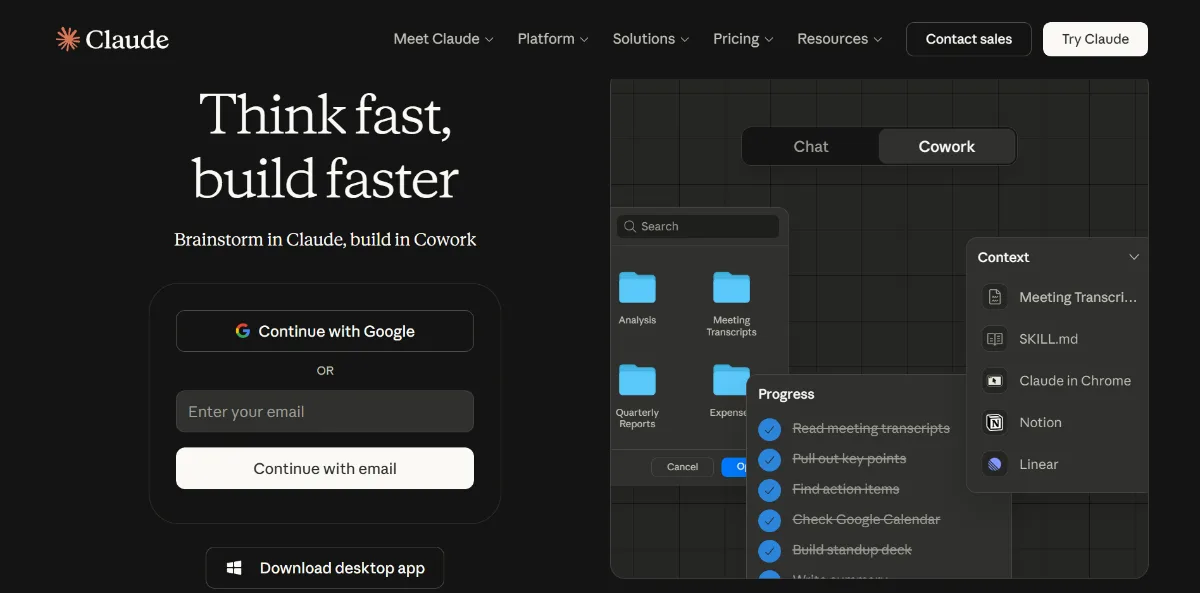
Claude is a large-language-model-based AI assistant from Anthropic, accessible via web, iOS, Android, and desktop. It handles a wide range of tasks — writing, coding, document analysis, multi-step reasoning, and research synthesis — through a conversational interface. What separates it from similar tools is not raw capability alone but the degree to which it maintains consistent, calibrated behavior across long sessions. Claude can hold an entire codebase, a stack of research papers, or a lengthy legal document in a single conversation window and reason across all of it without losing track. The Projects feature extends this further, allowing memory and context to persist across conversations. For enterprise users, a native API with support for Slack, Google Workspace, Microsoft 365, GitHub, and remote MCP connectors makes it practical as a working layer over existing tools.
Key Strengths
Claude's most significant technical differentiator is its context window, which now extends up to 1 million tokens with Opus 4.6 and Sonnet 4.6 — large enough to load an entire codebase, a lengthy legal agreement, or a stack of research papers and query across all of it without losing track. This is a meaningful operational difference for anyone working with document-heavy workflows where switching context mid-task is a productivity drain.
Constitutional AI is what distinguishes Claude's safety approach. Anthropic built a documented set of principles into the training process itself, making the model less prone to hallucination, less likely to produce confidently wrong answers, and more calibrated in how it handles uncertainty. For professionals in regulated fields — legal, medical, financial — this consistency is a practical differentiator, not just a marketing claim.
Claude is a strong tool for developers. Available from the Pro plan upward, Claude Code integrates directly into the terminal, VS Code, JetBrains, and as a desktop application. It can read entire repositories, write and edit files, run commands, and commit to git autonomously. For teams using Slack, Google Workspace, or Microsoft 365, the native connectors reduce the friction of incorporating AI into existing workflows rather than running it as a separate tool alongside them.
The Projects and Memory system enables Claude to maintain persistent context across multiple conversations — useful for ongoing client work, long research projects, or documentation tasks spread over weeks. Combined with file creation, code execution, and Artifacts, it functions well as a working layer rather than just a question-answering interface.
Best For
- Legal professionals and researchers processing large volumes of documents — contracts, case files, literature reviews — who need to query and cross-reference content without hitting context limits mid-analysis
- Developers building document analysis pipelines or agentic coding workflows who need a large context window and a terminal-native tool (Claude Code) without switching between multiple AI tools
- Teams using Slack, Google Workspace, or Microsoft 365 who want AI embedded in existing workflows through native connectors rather than as a standalone tab
- Writers and academics who need multi-document synthesis with low hallucination risk — particularly useful for grant writing, literature reviews, and technical documentation
- Uncommon use case: Compliance teams using the Enterprise plan to run internal policy documents and regulatory frameworks through Claude's context window for gap analysis — Claude can hold an entire policy library in context and flag inconsistencies across documents, a use case most teams would not associate with a general-purpose AI assistant
Who Should Look Elsewhere
- If you need image generation built into your AI workflow, Claude does not offer this. Gemini Ultra or ChatGPT with DALL-E integration are better fits for teams that want a single tool covering both text and visual generation.
- If your primary use case is highly visual or multimedia content creation — video scripts paired with storyboarding, or design briefs with immediate visual mockups — the text-only nature of Claude's output limits its usefulness compared to tools built for multimodal creation workflows.
- If you need maximum usage at the lowest possible price for simple, high-volume tasks, Haiku 4.5 via the API is cost-efficient, but on consumer plans the Free tier's unpublished, variable usage limits make it unreliable for consistent daily work. Tools like ChatGPT's free tier may offer more predictable access for light users.
Limitations
- No image generation — Claude processes and analyzes images but cannot produce them, which means any workflow requiring visual output needs a separate tool entirely
- Free plan usage limits are unpublished and variable — Anthropic does not disclose specific message counts, and limits shift based on demand. Users report sessions resetting every 5 hours with weekly limits, making the free tier unsuitable for any consistent professional use
- Performance in highly niche or specialized domains can be inconsistent, with Claude occasionally generating plausible but inaccurate outputs for topics outside mainstream knowledge — critical quality in expert fields
- Third-party agent framework support was restricted in April 2026 — Pro and Max subscribers can no longer use plan limits to power external agent tools like OpenClaw and must switch to pay-as-you-go API usage, which meaningfully affects developers who relied on subscription access for agent workloads
Pricing Overview
Claude offers a freemium structure across five consumer and business tiers. The Free plan covers web, iOS, Android, and desktop access with web search, memory, and code execution included — though usage limits are variable and unpublished. Pro at $17 per month (billed annually, or $20 monthly) adds Claude Code, Research mode, Projects, and approximately 5x the usage of the Free tier, making it the best value for individual professionals who use AI daily. Max plans at $100 and $200 per month provide 5x and 20x usage over Pro respectively, targeting power users and developers running intensive tasks. Team plans start at $20 per seat per month (annual billing) with premium seats at $100, adding enterprise search, SSO, and central administration. Enterprise starts at $20 per seat with API usage billed separately at token rates (Opus 4.6: $5 input / $25 output per million tokens). Pricing last verified: April 2026.
Our Assessment
In terms of reliability, Claude performs consistently across long-form tasks in a way that is not always guaranteed from general-purpose AI tools. The Constitutional AI foundation contributes to a level of calibration that makes it genuinely more trustworthy for professional content — it is less likely to produce confidently wrong answers and more likely to flag its own uncertainty, which matters in legal, financial, and research contexts. Ease of use is high for both first-time users and experienced practitioners; the interface is clean, the Projects system is genuinely practical, and Claude Code has emerged as a credible development tool with real adoption among professional engineers. Feature depth is strong at the Pro level and above — web search, memory, file creation, code execution, and enterprise connectors cover the majority of professional workflows without requiring additional tools. Value at the Pro tier is competitive for individual professionals; the Max and Team tiers are well-suited to heavy users and small teams. Enterprise pricing is transparent at the base level, which is an improvement over many competitors that obscure costs behind sales conversations. The one meaningful gap remains the absence of image generation, which keeps Claude as a text-and-code-first tool rather than a fully generalist AI platform.
Top Alternatives
- ChatGPT by OpenAI — Choose this when you need image generation via DALL-E, a broader plugin and tool ecosystem, or voice mode with real-time conversation as a primary use case
- Google Gemini Ultra — Choose this when deep integration with Google Workspace is your priority, or when you need multimodal AI that handles images, audio, and video natively
- Ollama with Local LLMs — Choose this when data privacy is paramount and you need to run models on-premise without any external dependency
Frequently Asked Questions
Q: Is Claude free to use, and what does the free version actually include?
Claude has a permanent free tier covering web, iOS, Android, and desktop access with web search, memory, image analysis, code generation, and file creation included. Usage limits apply and are not published as fixed numbers — they vary based on platform demand and reset on a rolling basis.
Q: How does Claude compare to ChatGPT for coding tasks in 2026?
Claude has a meaningful edge in terminal-native coding workflows through Claude Code, which integrates directly with VS Code, JetBrains, and the command line for autonomous file editing and git commits. ChatGPT's Code Interpreter is stronger for sandboxed data science tasks with visual outputs. The better choice depends on whether your workflow is development-oriented or data analysis-oriented.
Q: Can Claude be used for confidential or sensitive business documents?
Consumer plans (Free, Pro, Max) operate on an opt-out model for training data — you must actively disable this in account settings. Team and Enterprise plans guarantee no training on your content by default through contractual terms, making them the appropriate choice for confidential business use. Enterprise additionally includes HIPAA-ready options, audit logs, and custom data retention controls.
Q: Is Claude suitable for use in automating complex business documents?
Paid plans expose this option to set per-user and organizational spend limits. Enterprise plans include HIPAA-readiness, audit log retention, and role-level access controls, making Claude viable for enterprise automation workflows including document generation, data extraction, and network-level access controls.
Last reviewed: April 2026. Features and pricing are subject to change — always verify on the official website at claude.ai.
Screenshots
 1/1
1/1Key Features
Pricing Plans
Top Claude Alternatives & Competitors
Explore the best similar tools and how they compare.
The ultimate browser-based cockpit for GPT-5.2, Claude 4.5, and Gemini 3 Pro.
The all-in-one AI powerhouse: GPT-5, Claude 3.7, and Gemini in your pocket.

The default general-purpose AI assistant, now split across six tiers.
User Reviews
0 reviews · 0.0 avg rating
Be the first to review Claude
Help the community by sharing your honest experience with this tool.
Write a Review