
Zapier AI
Orchestrate AI across 9000+ apps with built‑in governance and one unified task‑based plan.
Pricing
FreemiumWhat is Zapier AI?
Is This Tool Right For You?
If you often juggle repetitive tasks across apps like Gmail, Slack, Salesforce, and Google Sheets and want to plug AI into those workflows, then Zapier AI is a strong fit. Its interface is no‑code, so even non‑developers can build multi‑step automations using guided steps rather than code. Below are quick signals to self‑qualify.
- >Yes, if: You regularly switch between 3–5 web apps and wish those actions happened automatically whenever something new appears in one of them.>Yes, if: You either already use ChatGPT or Claude and want those tools to trigger actions in your CRM, support ticket system, or email.>Yes, if: Your team shares apps and wants one central place to manage automations, permissions, and AI usage while keeping audit logs.
On the other hand, Zapier AI may not fit if you are in any of these situations.
- >No, if: You only ever work inside one app or are comfortable writing and maintaining your own scripts and serverless functions outside Zapier.>No, if: You need ultra‑low‑cost or high‑volume automation and are sensitive to task‑based pricing, where each AI action can eat multiple tasks quickly.
Quick Verdict
Zapier AI suits individuals, SMBs, and departments that want to weave AI into existing SaaS tools without writing code, especially if they already pay for ChatGPT or Claude. It stands out for connecting AI‑chat systems to real‑world apps and for offering a single, auditable layer across everything that runs. Its main limitation is that pricing is tightly tied to task volume, so heavy AI‑driven workflows can become expensive very quickly if you are not careful about how many actions they run.
What Zapier AI Does
Zapier AI is not a standalone chatbot; it is an orchestration layer that lets AI tools like ChatGPT, Claude, and custom agents call into your apps and trigger actions there. Instead of only getting text back from a chat, you configure Zaps—visual workflows where an AI model can, for example, read an email, decide if it is a lead, enrich it with data from your CRM, then create a ticket in your support tool and ping the right teammate in Slack. Zapier handles API keys, retries, and rate limits so you normally do not need to manage them yourself.
The core interface is a browser‑based canvas where you chain a trigger, optional filters and data‑formatting steps, and one or more actions. You can add AI actions directly from Zapier’s built‑in “AI by Zapier” tool, which uses OpenAI’s models under the hood, or connect external AI via Zapier MCP so your preferred AI assistant can invoke 30000+ actions across 9000+ apps. You interact mostly through forms, dropdowns, and plain‑language prompts rather than writing code, which makes it approachable for non‑developers yet still flexible enough to build complex multi‑step sequences.
Key Strengths
One of Zapier AI’s strongest suits is connectivity: it supports over 9000 integrations and exposes tens of thousands of triggers and actions, which is more than most competitors. This means you can connect many niche or older tools that other no‑code platforms do not support, and you can plug new AI services into systems that may not have their own AI integration. If you already use several SaaS tools, Zapier can act as a single synaptic hub rather than forcing you to build separate point‑to‑point integrations everywhere.
Another major strength is governance and visibility. Zapier provides a unified audit trail for every AI‑driven action, including which model or agent called which app and which data was sent. Admins can set action restrictions, define which apps AI is allowed to touch, and enforce SSO and SCIM, which is useful for companies that want to avoid “shadow AI” sprawl. Over time this can reduce the risk of sensitive data leaking through unmanaged scripts or browser extensions.
For teams that care about iteration, Zapier combines visual workflows with tables and forms so you can store and manage data in the same environment as your automation. Tables let you model customer records, products, or internal workflows without exporting to a separate database, and they can be read‑by AI fields that generate copy or classify rows. Forms let you build custom UIs that connect directly to Zaps and AI agents, so you can create internal dashboards or customer‑facing tools that still live inside the Zapier ecosystem.
Finally, the platform is designed to scale horizontally across pricing tiers without changing how you model your logic. You can start on the Free plan with simple two‑step Zaps and AI‑assisted creation, then move to Professional or Team when you need multi‑step workflows, shared connections, and finer‑grained controls. Enterprise adds observability, custom deployment options, and higher task limits, meaning the same fundamental concepts carry through whatever size you are.
Real Use Cases
- >Lead qualification via AI: A small sales team uses an AI agent that reads incoming emails and website form submissions, runs named‑entity recognition to classify them as “Marketing Qualified Leads,” and then enriches the records with company data before creating them in their CRM and assigning a follow‑up task to the right rep in Slack. This cuts the time between first contact and first outreach from hours to seconds.>Support ticket triage: A customer‑support team connects their helpdesk to a Zapier AI agent that reads incoming tickets, summarizes them, and classifies urgency and product area. If the ticket is high‑priority, the agent creates a short briefing and posts it in an internal Slack channel, assigns a label in the ticketing system, and drops a draft reply that the human agent can tweak and send.>AI‑driven content publishing: A marketing team sets up a Zap where every new blog post triggers AI to generate multiple social‑media variations, then schedules those posts to Buffer or directly to platforms like LinkedIn and Instagram. The whole chain—from CMS to AI to social—is driven by one Zap, so the team does not need to copy‑paste headlines or manually create posts.>Internal onboarding and HR workflows: An HR team builds an AI agent that monitors new hires in their HRIS and automatically gathers documents, sets up accounts, and sends personalized welcome emails with links to training resources. The agent can also answer common questions through a Zapier‑powered chatbot embedded in the company’s intranet, reducing repetitive queries for HR staff.>Developer‑tool coordination: A product team connects GitHub to Zapier AI so that every new pull request triggers a brief summary from the AI model, which is posted in Slack along with a formatted list of changed files. The team can also use another Zap to create Jira tickets automatically from specific labels or issue templates, keeping engineering and product aligned without manual copy‑pasting.
Best For
- >Freelancers and solopreneurs who want to connect freelance platforms, email, and project‑management tools into one AI‑assisted workflow, for example automatically sending proposal summaries to clients and logging hours in accounting software.>Marketing and content teams that run multiple social channels and want AI to draft posts, schedule them, and collect engagement metrics into a central dashboard without custom code.>Customer‑support orgs that handle high‑volume tickets and need an AI layer to triage, summarize, and route to the right human agents while keeping everything logged in one place.>SMBs and mid‑size companies that want to roll out AI safely across departments with shared connections, role‑based access, and SSO rather than dozens of separate AI tools per person.>Uncommon use case: Internal audit or compliance teams that use Zapier AI to scan incoming documents and contracts, highlight potential violations against policy rules, and create structured reports in a shared table that can be exported for review.
Who Should Look Elsewhere
- >High‑volume, low‑cost automation buyers may find Make.com a better fit if they need more tasks per dollar and more advanced routing and looping features without the same per‑task price pressure Zapier can impose when AI actions are heavy.>Developers who prefer full code control should consider n8n or self‑hosted frameworks like LangChain plus custom scripts, since those tools let you build and debug complex logic in code and run them on your own infrastructure rather than inside a vendor’s task‑based meter.>Enterprise teams that already heavily rely on Microsoft 365 may prefer Power Automate if they want deep integration with Teams, SharePoint, and Dynamics plus first‑party licensing and support, even if that means fewer third‑party AI connectors compared with Zapier.
Limitations
- >Task‑based cost can escalate quickly with AI, since each AI action in a Zap consumes tasks and complex agent flows can burn through hundreds of tasks in a single month, especially if you forget to filter or batch inputs early in the workflow.>Debugging multi‑branch AI workflows is often messy, because the UI for tracing what went wrong in a long Zap or agent is still relatively primitive; you sometimes need to inspect logs across multiple steps and manually reconstruct failure scenarios.>Some advanced programming features are missing, such as native foreach loops or complex branching logic, so you must approximate them with workarounds or auxiliary apps, which can make maintenance and documentation harder.>Free tier limits are quite tight for active users, offering only 100 tasks per month and two‑step Zaps, which makes it mostly suitable for experimentation rather than running production‑level AI workflows that see real traffic.
Pricing Overview
Zapier AI lives inside unified “AI orchestration” plans that bundle Zaps, Tables, Forms, and MCP. The Free plan is $0 per month and includes 100 tasks, unlimited Zaps, Tables, and Forms, plus two‑step Zaps and Zapier Copilot AI assistance. The Professional plan starts at $19.99 per month when billed annually (or $29.99 per month if paid monthly) and unlocks multi‑step Zaps, unlimited Premium apps, webhooks, email and live‑chat support, AI fields, and conditional form logic. The Team plan starts at $69 per month when billed annually and adds 25 users, shared Zaps and folders, shared app connections, SAML SSO, and Premier Support. The Enterprise plan is custom‑priced and offers unlimited users, advanced admin controls, observability, and annual task limits tailored to large organizations.
For most small teams and power users, Professional is the best‑value tier because it lifts the most functional limits while still being affordable. The Team plan only becomes worthwhile if you have multiple people collaborating on the same set of workflows and need shared connections and SSO. Enterprise is reserved for organizations that want formal SLAs, technical account management, and deep governance, and its pricing is negotiated case‑by‑case. Pricing last verified: April 2026.
Our Assessment
Zapier AI is one of the most practical ways to connect AI to your existing SaaS tools without hiring engineers, especially if you value a single visible layer for what AI does across your stack. The platform is generally reliable, with 99.9% uptime and a long‑standing infrastructure pedigree, and the visual editor is intuitive enough that many non‑technical users can build useful workflows in under an hour. The inclusion of Tables and Forms inside every plan makes it easy to model data and build lightweight internal tools without leaving the environment.
That said, the experience is not frictionless. The task‑based model rewards simplicity, so complex AI agents that call many actions can surprise you on the bill. Some advanced automation patterns, such as iterating over arrays or building deeply nested conditions, still feel more like puzzles than solved problems, and error‑handling is more basic than what you would get in a code‑first toolchain. Support quality also improves dramatically on higher tiers, which can be frustrating if you start on Free or Pro and hit a tricky connectivity issue.
From a value‑for‑money standpoint, Zapier AI shines when you are already using many SaaS tools and want to plug in AI in a governed, auditable way. If you only need a couple of AI‑assisted workflows and are budget‑conscious, you might overpay for the platform’s breadth. But for teams that want AI to be woven into the fabric of their daily operations rather than a separate, siloed tool, Zapier AI offers a compelling mix of depth, integrations, and governance.
Top Alternatives
- >Make.com — Choose this instead if you want more tasks per dollar and advanced routing and looping features, especially for high‑volume, non‑AI workflows.>n8n — Pick this if you prefer code‑first or self‑hosted automation and want full control over logic, error handling, and deployment infrastructure.>Power Automate — Opt for this if you operate mostly inside the Microsoft 365 ecosystem and want tight integration with Teams, SharePoint, and Dynamics with enterprise‑grade support.
Frequently Asked Questions
Q: Does Zapier AI include its own chatbot interface or do I need another AI service?
Zapier AI can use built‑in AI actions powered by OpenAI models, but you can also connect external AI tools like ChatGPT or Claude via Zapier MCP. You are not forced to use only one backend; you can choose which model or assistant drives each workflow and keep it connected through Zapier’s secure layer.
Q: How many tasks do AI actions consume compared with regular steps?
A typical AI action in a Zap counts as one or more tasks, depending on how many actions it triggers downstream. When using Zapier MCP, each tool call can consume two tasks from your quota, so complex AI‑driven workflows can run through your monthly limit faster than simpler data‑moving Zaps.
Q: Can I use Zapier AI without knowing how to code?
Yes, Zapier is designed as a no‑code platform, so you interact with it through a visual editor, forms, and plain‑language prompts rather than writing code. You can build meaningful AI‑driven workflows without touching a terminal or API, though some advanced patterns may require learning how to structure data and logic effectively.
Q: Are there any recent changes to Zapier AI that affect pricing or limits?
Yes, Zapier has moved to unified AI‑orchestration plans where Zaps, Tables, Forms, and MCP are packaged under one task‑based subscription, and the Free plan now offers only 100 tasks per month. The platform also lets you switch to pay‑per‑task billing once you hit your plan’s limit, so your workflows do not stop, but your bill can rise if you are not careful about optimizing AI‑heavy sequences.
Q: Can Zapier AI run long‑running AI agents that work while I sleep, and how are they priced?
Zapier offers a separate Agents product that lets you create AI‑powered colleagues that run 24/7, with Free giving 400 activities per month and Pro offering 1,500 activities per month. Activities include actions the agent takes in behaviors or chat, web browsing, or knowledge lookups, and those are billed separately from your main Zapier orchestration plan.
Last reviewed: April 2026. Features and pricing are subject to change — always verify on the official website at https://zapier.com.
Screenshots
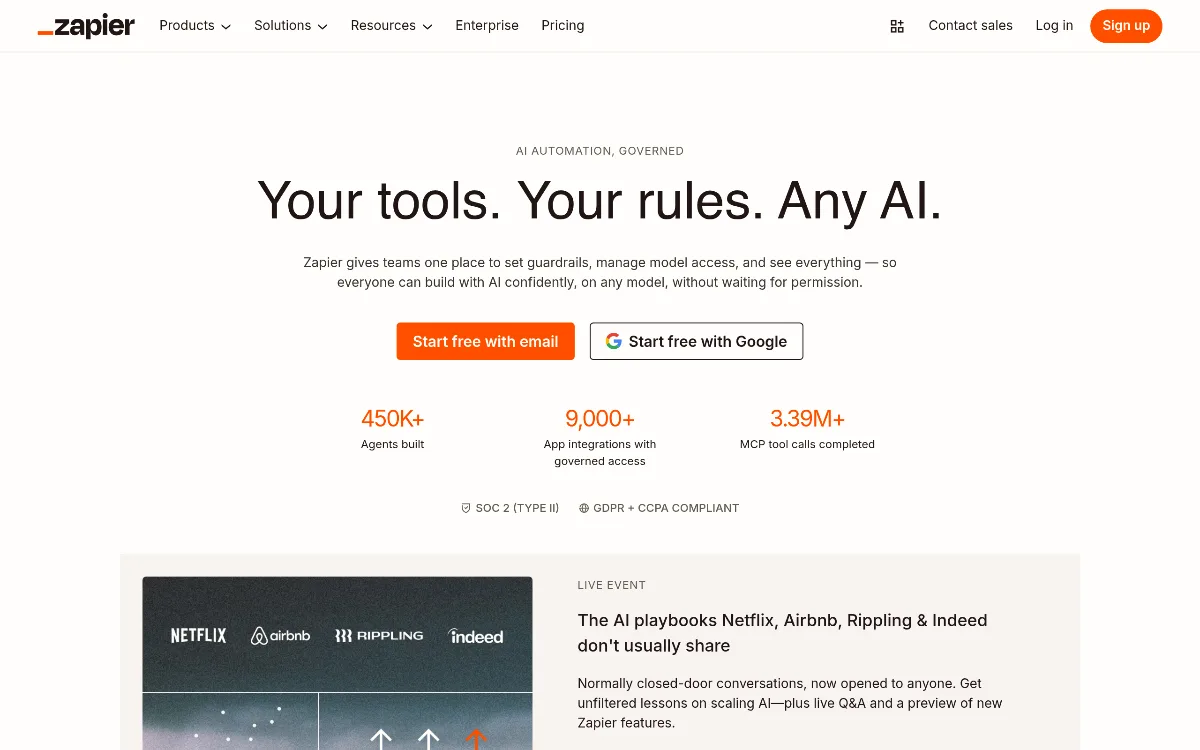 1/1
1/1Key Features
Pricing Plans
Free
$0/mo
Professional
$19.99/mo (annual) or $29.99/mo (monthly)
Team
$69/mo (annual)
Enterprise
Contact for pricing
Top Zapier AI Alternatives & Competitors
Explore the best similar tools and how they compare.
A massive Swiss Army Knife for AI: Images, Video, Music, and Apps in one place.
User Reviews
0 reviews · 0.0 avg rating
Be the first to review Zapier AI
Help the community by sharing your honest experience with this tool.
Write a Review