

Notion AI
The first AI that doesn't just write your notes it actually does your work.
Pricing
FreemiumWhat is Notion AI?
Is This Tool Right For You?
✔ You are already a heavy Notion user with a well-organized workspace and want to automate your repetitive manual tasks.
✔ Your team needs a central 'source of truth' that can search across Slack, Google Drive, and Salesforce simultaneously.
✔ You want an AI that doesn't just write text but actually performs multi-step workflows like updating databases and routing tickets.
✔ You handle high volumes of meetings and need automated transcriptions and summaries without inviting third-party 'bot' users to your calls.
✖ You are looking for a standalone AI writing tool with the most advanced creative features (specialized tools still lead here).
✖ Your Notion workspace is cluttered or disorganized; the AI's effectiveness is directly tied to your data quality.
✖ You are on a very tight budget and cannot justify an $8-$10 per user monthly add-on fee.
Quick Verdict
In 2026, Notion AI has successfully transitioned from a simple 'writing assistant' into a sophisticated 'workspace intelligence layer.' It is no longer just about fixing grammar or summarizing a page; the introduction of Notion Agents and Custom Agents in early 2026 has changed the game. For teams already living in Notion, the $8/month (annual) investment is now a high-value proposition because it replaces multiple third-party tools for transcription, enterprise search, and basic automation. While standalone LLMs might still offer slightly more 'creative' edge, the deep integration of GPT-5 and Claude 4.1 directly into your existing databases makes Notion AI the most practical productivity tool for knowledge workers this year.
What Notion AI Does
Notion AI is a deeply integrated suite of artificial intelligence capabilities built directly into the Notion platform. As of 2026, it functions as a programmable agent platform rather than just a chat interface. It utilizes a mix of top-tier models, including GPT-5 and Claude 4.1 Opus, to understand the context of your entire workspace.
The tool operates across three primary pillars: Knowledge Retrieval (searching your workspace and connected apps like Salesforce or Slack to answer questions), Content Generation (writing, summarizing, and transcribing), and Autonomous Action (using Custom Agents to perform multi-step tasks like project scheduling or database maintenance). Unlike early versions of AI assistants, the 2026 version of Notion AI has 'cross-page awareness' and can execute code, allowing it to handle complex logic within your databases and documents without manual intervention.
Key Strengths
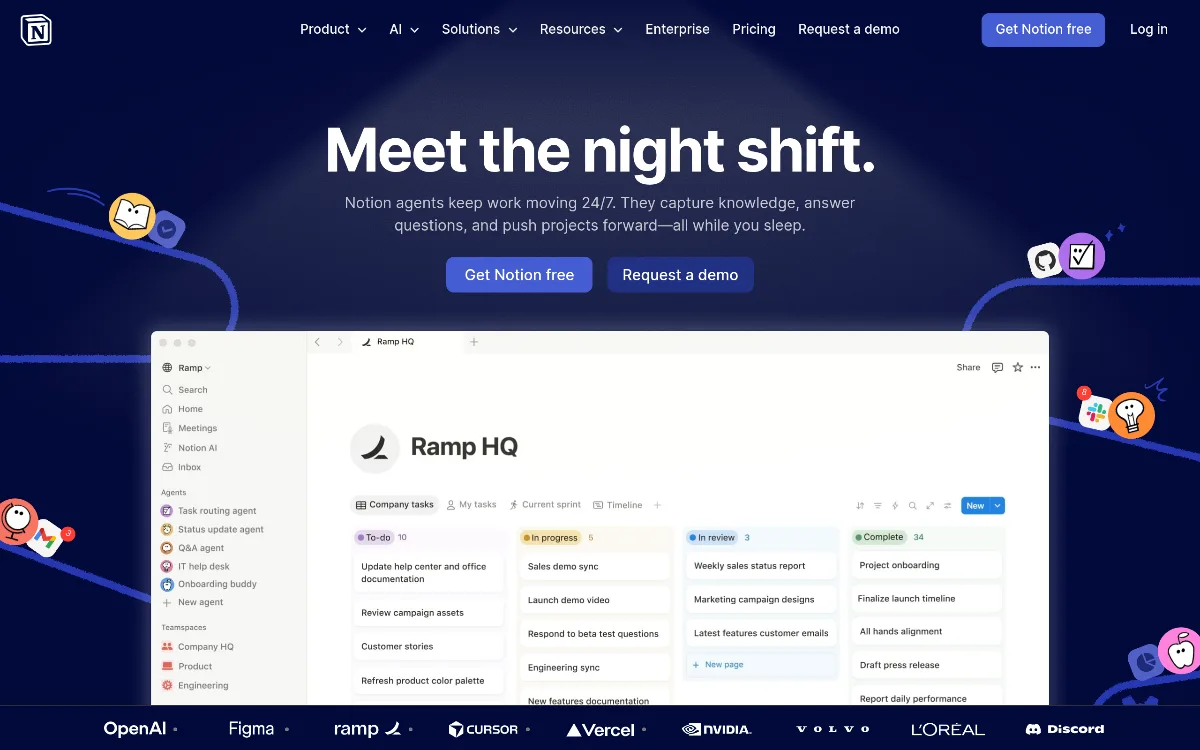
Autonomous Custom Agents: Perhaps the most significant update in Notion 3.4 is the ability to build agents that handle 'boring' work. These aren't just chatbots; they are programmable entities that can build pages, update database properties, and even post updates to external tools like Slack autonomously. You can now 'teach' your agent specific skills related to your unique workflows.
Enterprise-Wide Search: Notion AI has solved the 'where is that file?' problem. It can now search across your entire tech stack, including Google Drive, GitHub, Slack, and Salesforce. Instead of switching tabs, you ask the Q&A feature a question, and it pulls the answer from a Slack thread or a Google Doc and cites the source directly in Notion.
AI-Native Meeting Notes: The 2026 version includes built-in transcription that works without external bots. It features new audio consent controls (added in March 2026) that automatically play a message to participants, ensuring compliance. The AI then summarizes the meeting, extracts action items, and can even auto-populate your task database.
Deep Database Integration: The AI 'Autofill' feature for databases has matured into a sub-3-second experience. It can automatically categorize entries, extract key data from long documents, and maintain database hygiene without any manual data entry from your team.
Real Use Cases
GTM Teams Scaling Enablement: A Go-To-Market team (like the one at Ramp) uses a custom 'Enablement Agent' to instantly pull up the right sales collateral or answer complex customer questions by searching through internal documentation and Salesforce data simultaneously.
IT Support Automation: IT departments (similar to the team at Clay) have deployed 'IT Buddy' agents within Notion. These agents resolve common employee questions in minutes by referencing internal wikis and troubleshooting guides, reducing the ticket load on human staff.
Competitive Intelligence: Marketing teams (like Brain Trust) use agents to track competitor movements across the web and internal call transcripts. The agent then automatically revises internal strategy docs every morning so the team starts the day with the latest intel.
Project Managers Scheduling: A project manager can describe a complex project in a single paragraph, and Notion AI will build out the entire task timeline, assign owners based on past workloads, and generate the necessary database structure from scratch.
Indie Developers Shipping Features: Developers use the code execution capabilities within Notion AI to write scripts that automate their documentation updates or summarize GitHub pull requests directly into their Notion roadmap.
Best For
- Knowledge-Heavy Teams: Organizations with vast amounts of documentation who need an instant way to find information across multiple platforms.
- Project Managers: Those who need to turn messy notes into structured task lists and timelines without manual clicking.
- Sales Operations: Teams that want to view Salesforce accounts and opportunities directly within their workspace without leaving Notion.
- Content Creators: Writers who need a high-quality 'sparring partner' that understands their previous work and brand voice.
- HR and Ops: Managers who want to automate repetitive employee onboarding tasks or internal FAQ responses using Custom Agents.
Who Should Look Elsewhere
Pure Creative Writers: If your only goal is long-form creative writing, specialized tools like Jasper or Copy.ai still offer more nuanced 'brand voice' controls and marketing-specific templates that Notion lacks.
Extreme Power-Users of LLMs: If you need the absolute latest, un-sandboxed version of ChatGPT (OpenAI) or Claude (Anthropic) for heavy coding or research, using the standalone apps might be faster than waiting for the Notion integration to catch up.
Non-Notion Users: If you aren't already using Notion for your docs or projects, the AI isn't a good enough reason to switch on its own. It is a force multiplier for existing Notion data, not a replacement for a dedicated search engine.
Limitations
Workspace Organization Dependency: Notion AI is only as good as the data it can read. If your workspace is full of outdated 'Draft_V2' pages, the Q&A feature will occasionally provide outdated or conflicting answers.
The 'Add-On' Tax: For many users, $8 to $10 per month per user feels steep on top of the base subscription, especially for large teams where not every member uses the AI features daily.
Agent Setup Complexity: While 'Custom Agents' are powerful, they require a bit of a learning curve to set up correctly. They are not 'plug-and-play' for complex multi-step workflows yet.
Model Latency: While the 2026 updates have improved speed, complex queries that involve searching Salesforce and Slack simultaneously can still take several seconds to generate a complete answer.
Pricing Overview
Notion AI pricing in 2026 remains structured as an add-on for most users, though it is increasingly bundled into higher-tier plans. Here is the breakdown:
- Monthly Add-on: $10 per user/month. This can be added to any Free, Plus, or Business plan.
- Annual Add-on: $8 per user/month (billed annually). This is the most popular option for long-term users.
- Business Plan (New for late 2026): $20 per user/month. For new subscribers as of September 2026, AI is often included directly in the Business and Enterprise tiers without a separate add-on fee.
- Custom Agents Trial: Custom Agents are currently available for a free trial for all users until May 3, 2026.
Pricing last verified: April 2026.
Our Assessment
Our assessment of Notion AI in 2026 is that it has finally moved past the 'gimmick' stage. In 2024 and 2025, many users felt the AI was just a wrapper for ChatGPT that lived inside their notes. However, the 2026 version — specifically with the release of Notion 3.4 — feels like a cohesive operating system for work. The value for money is exceptionally high if you utilize the Enterprise Search and Meeting Notes features, as these would typically cost $20-$30/month as standalone apps.
The ease of use remains top-notch; if you can type a slash command (/) or press the spacebar, you can use the AI. The depth of features, particularly the Custom Agents, allows for a level of customization that competitors like Microsoft Loop or Coda are still struggling to match. We believe the biggest value is for teams of 10-50 people who are drowning in information and need an 'automated librarian' to keep everything organized. If you already pay for Notion, the $8 annual add-on is likely the best productivity investment you'll make this year. It effectively turns your static notes into a living, breathing database that updates itself.
Top Alternatives
Claude (Anthropic) — Choose Claude when you need superior long-form writing and deep reasoning without the need for database integration.
ChatGPT (OpenAI) — Choose ChatGPT when you want the fastest, most versatile general-purpose AI for coding and miscellaneous tasks.
Jasper — Choose Jasper when your primary focus is high-scale marketing content and advanced brand-voice management.
Frequently Asked Questions
Q: Does Notion AI use my data to train its models?
No. As of 2026, Notion maintains strict privacy controls. Your workspace data is not used to train the underlying LLMs (like GPT-5 or Claude) for other users. Workspace owners also have granular controls over AI meeting note consent.
Q: Can Notion AI really search my Salesforce data?
Yes. As of the March 11, 2026 update, Notion AI can search across Salesforce accounts, leads, opportunities, and contacts. You can ask questions about your pipeline directly within the Notion interface.
Q: How do the new 'Custom Agents' work?
Custom Agents are programmable assistants that you can 'teach' specific skills. They can perform multi-step tasks like watching a database for changes, summarizing the new data, and then posting that summary to a specific Slack channel or creating a new project page.
Q: Is there a free version of Notion AI?
Notion AI is primarily a paid add-on. However, Notion frequently offers free trials for new features. For example, the new Custom Agents are free to try for all users until May 3, 2026.
Q: How does the AI Meeting Notes feature work without a bot?
Notion AI uses integrated audio processing to transcribe meetings directly. Instead of a 'Notion Bot' joining your Zoom call, you can record or upload audio, and Notion handles the transcription and summarization internally, complete with automated consent notifications for participants.
Last reviewed: April 2026. Features and pricing are subject to change — always verify on the official website.
Screenshots
 1/1
1/1Key Features
Pricing Plans
Monthly Add-on
$10/user/mo
Annual Add-on
$8/user/mo
Business Tier (AI Included)
$20/user/mo
User Reviews
0 reviews · 0.0 avg rating
Be the first to review Notion AI
Help the community by sharing your honest experience with this tool.
Write a Review