
Julius AI
The AI-powered data analyst that chats with your SQL databases and spreadsheets.
What is Julius AI?
Is This Tool Right For You?
Julius AI has positioned itself as the premier "AI Data Analyst" in 2026. But is it the right fit for your specific workflow? Here is the breakdown:
- ✔ Data-heavy professionals who need to query SQL databases or large CSVs without writing manual code.
- ✔ Marketing and Sales teams looking to visualize campaign performance or CRM data through simple chat prompts.
- ✔ Researchers and Students who need to perform complex statistical analysis and generate academic-grade charts quickly.
- ✔ Founders and Indie Developers who want a data scientist experience without the $150k/year salary.
- ✖ Casual users who only need basic addition or subtraction in a small spreadsheet (standard Excel is faster).
- ✖ Enterprise teams with strictly air-gapped data requirements that cannot use cloud-based AI processing.
Quick Verdict
In 2026, Julius AI remains the gold standard for conversational data analysis. While competitors like ChatGPT have improved their data modes, Julius wins on its specialized infrastructure—specifically its ability to handle massive datasets with up to 32GB of RAM and its native connections to heavy-duty warehouses like Snowflake and BigQuery. The integration of GPT-5.5 makes the reasoning sharper than ever, allowing it to spot trends that previous models might miss. If you are tired of wrestling with VLOOKUPs or writing buggy SQL queries, Julius is the most competent "AI Agent" for data we have tested this year. It is a powerful, reliable, and surprisingly intuitive bridge between raw data and actionable business intelligence.
What Julius AI Does
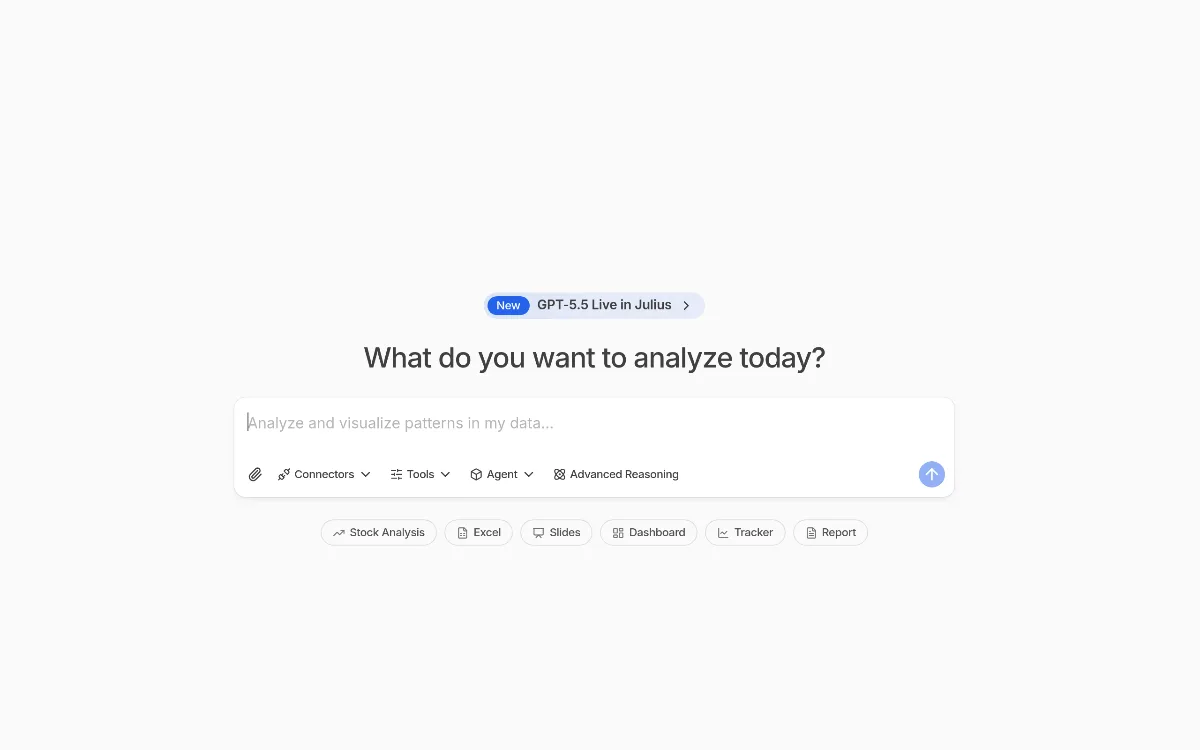
Julius AI is an advanced AI-powered data agent designed to act as a virtual data scientist. Unlike a standard chatbot, Julius is built specifically to interact with structured data. You don't just ask it questions; you connect it to your sources—be they Excel files, Google Sheets, or enterprise-grade SQL databases—and it performs actual computation to give you answers.
The tool works by interpreting your natural language requests, writing the necessary code (usually Python or SQL) in the background, executing that code in a secure environment, and then presenting the results as text, tables, or interactive visualizations. In 2026, Julius has evolved into a multi-modal platform that doesn't just analyze data but also helps you communicate it. It can generate slide decks, detailed reports, and even automated dashboards that track your metrics in real-time. Whether you are performing a complex cash flow forecast or segmenting a million-row customer list, Julius handles the heavy lifting of data processing while you focus on the strategy.
Key Strengths
- High-Performance Compute Power: Unlike standard AI wrappers, Julius provides dedicated RAM (up to 32GB on Pro plans) to process data. This means it can handle large-scale datasets that would crash a typical browser-based AI tool, ensuring your analysis is stable and fast.
- Deep Enterprise Integrations: Julius doesn't live in a vacuum. It connects natively to the tools where your data actually lives, including Snowflake, PostgreSQL, BigQuery, and Databricks. This eliminates the need for constant manual CSV exports and imports.
- Advanced Reasoning with GPT-5.5: By leveraging the latest GPT-5.5 models, Julius can perform "Advanced Reasoning." It doesn't just calculate numbers; it understands context, identifies outliers, and suggests logical next steps for your analysis based on business goals.
- Multi-Format Output: Julius is a full-cycle tool. It can take a raw SQL query and turn it into a formatted Excel sheet, a PowerPoint presentation, or a live Dashboard Tracker, making it easy to share insights with stakeholders who don't have technical skills.
Real Use Cases
- Marketing Team running campaigns: A Marketing Manager connects Julius to their Meta Ads and Google Drive data to calculate the exact acquisition channel efficiency across different demographics, generating a visual report for the weekly sync.
- Indie Developer shipping features: A solo founder connects Julius to their Postgres database to analyze user retention cohorts, identifying exactly which feature update led to a spike in churn.
- Finance Analyst: A professional in finance uses the "Cash Flow Forecasting" template to project the next 12 months of runway based on historical spend data stored in Excel and SQL Server.
- University Researcher: A grad student uploads a massive dataset of experimental results and uses Julius to perform ANOVA testing and generate publication-quality charts in seconds.
- Sales Operations: A Sales Lead uses the "Sales CRM Analysis" template to identify which regions are underperforming and asks Julius to suggest three specific strategies to improve conversion based on historical trends.
Best For
- Data Analysts who want to automate the repetitive parts of their job, like cleaning data and generating basic charts, to focus on high-level strategy.
- Non-Technical Managers who need to get answers from company databases without waiting three days for the IT team to run a SQL report.
- Startups and Small Orgs that need the capabilities of a data department but don't have the budget to hire a full team yet.
- Power Users who require high-context windows and massive RAM (Max plan) to analyze complex, multi-layered data structures.
Who Should Look Elsewhere
- Tableau/PowerBI Purists: If your primary need is highly customized, pixel-perfect enterprise dashboards with complex user-level permissions, traditional BI tools like Tableau still offer more granular control over UI design.
- Simple Spreadsheet Users: If you are just managing a personal budget or a simple to-do list, ChatGPT Plus or even Google Sheets' built-in AI features are likely sufficient and more cost-effective.
- Highly Sensitive Government Data: While Julius is SOC 2 Type 2 certified, organizations requiring on-premise, air-gapped AI solutions should look at specialized enterprise vendors like Palantir.
Limitations
- Credit-Based System: Julius has moved to a credit-based billing model. While this allows for more complex tasks, users must be mindful that "heavy" compute tasks (like complex reasoning or large data processing) consume more credits than simple questions.
- RAM Caps on Lower Tiers: The Free and Plus tiers are limited to 2GB of RAM. If you are trying to process massive datasets (e.g., several million rows), you will likely be forced to upgrade to the Pro tier for the 32GB allocation.
- Learning Curve for Semantic Layers: To get the most out of database connections (like Snowflake), you may need to help Julius build a "semantic layer" or upload a data dictionary to ensure it understands your specific table naming conventions.
- Seat Costs for Teams: While individual plans are affordable, the jump to the Business tier ($450/mo) is significant, which might be a steep entry point for very small teams of 3-4 people.
Pricing Overview
Julius AI offers a tiered pricing structure designed to scale from students to large enterprises. In 2026, the pricing is as follows:
- Free ($0/month): Best for individuals with small projects. Includes 100 credits per month, access to Notebooks, basic file storage, Google Drive connector, and 2GB of RAM.
- Plus ($20/month or $16/mo billed annually): Includes 2,000 credits per month, access to Plus models, unlimited file storage formats, and unlimited charts.
- Pro ($45/month or $37/mo billed annually): Designed for heavy data needs. Includes 4,000 credits per month, access to Pro models, an expanded context window, 32GB of RAM, and priority email support.
- Max ($200/month or $166/mo billed annually): For power users. Includes 20,000 credits, the largest context window available, early access to unreleased features, and a private Slack channel with the Julius team.
- Business ($450/month or $375/mo billed annually): For teams. Includes 45,000 credits, 10 seats, advanced connectors (Postgres, BigQuery, Snowflake), no table limits, custom agents, and scheduled reports.
- Growth ($750/month or $625/mo billed annually): For scaling startups. Includes 75,000 credits, up to 30 seats, Notion/Github knowledge base connections, a configurable data dictionary, and a dedicated Slack channel with the CEO.
Pricing last verified: October 2026.
Our Assessment
Julius AI is arguably the most "mature" AI data tool we have reviewed in 2026. What sets it apart is that it doesn't just feel like a wrapper around an LLM; it feels like a purpose-built IDE for data. The transition to credit-based billing is a clear sign of the high compute costs involved in running 32GB RAM environments for data processing, and while it might frustrate some light users, it ensures that power users have the resources they need for heavy lifting.
The ease of use is exceptional. Being able to connect a Postgres database and immediately ask, "Which customer segment has the highest LTV but the lowest engagement?" and get a charted answer in 15 seconds is transformative for business productivity. The value for money is highest at the Pro level ($45/mo), where the 32GB RAM and expanded context window truly unlock the tool's potential for professional-grade work. For teams, the Business tier is a significant investment, but when compared to the cost of a dedicated data analyst, the ROI is easy to justify. If you work with data every day, Julius is no longer a luxury—it is a core part of the modern tech stack.
Top Alternatives
- ChatGPT Plus (Data Analysis Mode) — Choose ChatGPT when you only have small CSV files and don't need native SQL database connections.
- Akkio — Choose Akkio when your focus is primarily on predictive modeling and lead scoring rather than general data exploration.
- Tableau — Choose Tableau when you need to build complex, permanent corporate dashboards that require high-level visual customization.
Frequently Asked Questions
Q: How does Julius handle my data security and privacy?
Julius is SOC 2 Type II, GDPR, and CCPA compliant. They ensure that customer data is processed securely and offer enterprise-grade controls like SSO/SAML (Okta, Azure) and audit logging for their higher-tier plans.
Q: Can Julius work with my specific database if it has thousands of tables?
Yes. Julius builds a semantic layer of your schema to identify relevant information without being overwhelmed by thousands of tables. You can also upload a data dictionary or use Custom Agents to help the AI focus on the most important parts of your database.
Q: What is the difference between "credits" and "messages"?
In 2026, Julius uses a credit system. Simple questions use fewer credits, while complex tasks—like training a model, processing a massive file, or using "Advanced Reasoning" (GPT-5.5)—consume more credits due to the higher compute required.
Q: Can I use Julius directly inside Slack?
Yes, Julius offers a Slack Agent (available on Business and Growth plans) that allows you to perform ad-hoc analysis, share reports, and collaborate on data directly within your team's Slack channels.
Q: Do I need to know how to code to use Julius?
Absolutely not. Julius is designed for natural language interaction. It writes the Python or SQL code for you. However, it does show you the code it wrote, which is a great way to learn if you are interested in seeing the logic behind the analysis.
Last reviewed: October 2026. Features and pricing are subject to change — always verify on the official website.
Screenshots
 1/1
1/1Key Features
Pricing Plans
Free
$0/mo
Plus
$20/mo
Pro
$45/mo
Max
$200/mo
Business
$450/mo
Growth
$750/mo
Top Julius AI Alternatives & Competitors
Explore the best similar tools and how they compare.
Turn scattered customer feedback into actionable roadmap opportunities with AI.
User Reviews
0 reviews · 0.0 avg rating
Be the first to review Julius AI
Help the community by sharing your honest experience with this tool.
Write a Review