
PicsArt
The AI creative powerhouse with 30+ models for images, video, and automation.
Pricing
FreemiumWhat is PicsArt?
Is This Tool Right For You?
Finding the right creative tool in 2026 is less about finding a single feature and more about finding a workflow that doesn't slow you down. Picsart has evolved significantly from its roots as a mobile filter app into a robust AI-first ecosystem. Here is who should (and shouldn't) be using it:
- ✓ Social Media Managers: If you need to churn out high-quality, "scroll-stopping" content for Instagram or TikTok daily, the AI presets and trending effects are built for your workflow.
- ✓ Small Business Owners: The V10 background remover and product-focused AI models make it easy to create professional e-commerce listings without a studio.
- ✓ Casual Creators & Hobbyists: The free tier is generous enough for occasional projects, and the interface is intuitive enough for non-designers.
- ✓ Developers: With the Picsart CLI and Enterprise API, you can automate creative assets directly from your terminal or build them into your own apps.
- ✗ Professional Retouchers: If your work requires pixel-perfect manual manipulation or advanced layer masking found in Photoshop, Picsart’s AI-heavy approach might feel too automated.
- ✗ High-End Video Editors: While the AI video features (like Kling 3.0) are impressive for short clips, it is not a replacement for a full-featured NLE like Premiere Pro.
Quick Verdict
In 2026, Picsart has successfully transitioned from a "mobile photo editor" to a comprehensive "AI Creative Platform." Its greatest strength is its role as a model aggregator; instead of forcing you to use one proprietary AI, it gives you access to over 30 leading models including Flux.2 Pro, Ideogram V3, and Kling 3.0. For the price of a single subscription, you’re getting a toolkit that would otherwise require multiple separate AI accounts. While the interface can occasionally feel cluttered with its massive feature set, the sheer versatility for social media and marketing content is currently unmatched in the mid-tier SaaS market.
What Picsart Does
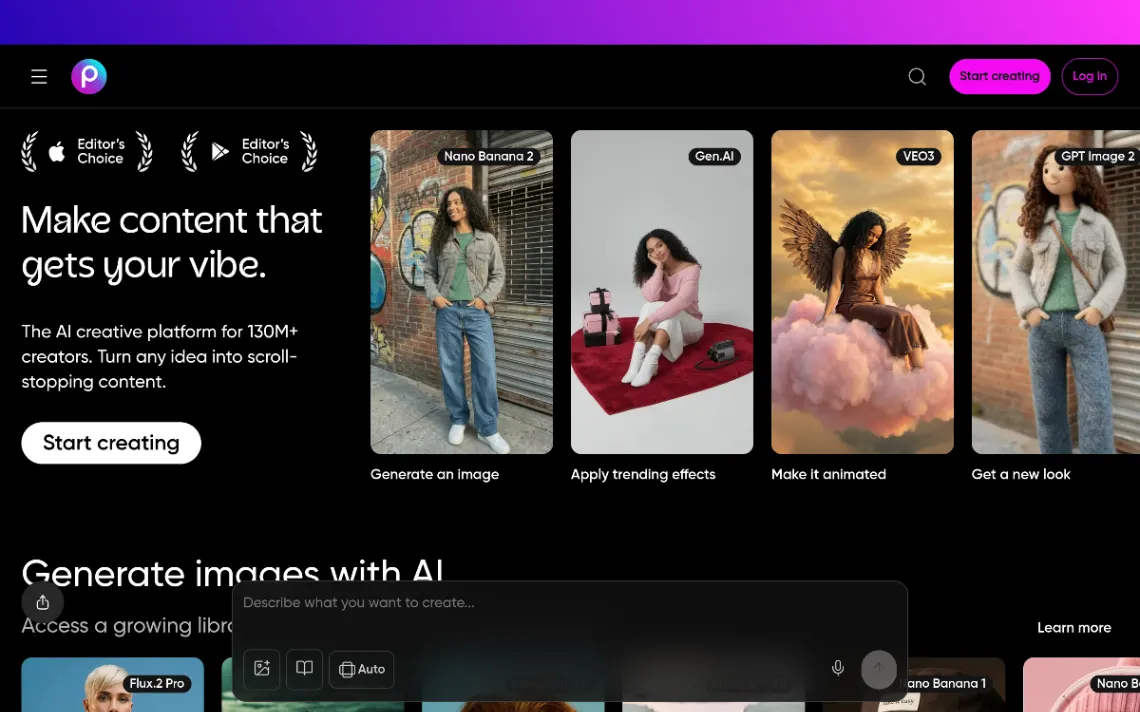
Picsart is a multi-platform creative suite that leverages generative AI to handle everything from static image generation to complex video editing. It serves over 150 million monthly active users by providing a bridge between simple one-tap edits and professional-grade AI generation. The platform operates as an "AI providers hub," meaning it integrates third-party models alongside its own proprietary technology. This allows users to generate images from text, swap clothing in photos, animate static images, and even generate 3D characters within a single interface.
Beyond simple editing, Picsart now offers developer-focused tools like a Command Line Interface (CLI) for auto-generating content and an Enterprise-grade API. This shift suggests Picsart is no longer just for the individual creator but also for companies looking to scale their creative output through automation. Whether you are using the web version or the award-winning mobile apps, the core experience revolves around "Flows"—pre-designed sequences that help you turn a basic idea into a finished marketing asset in minutes.
Key Strengths
Unrivaled Model Variety: Unlike competitors who lock you into one AI engine, Picsart provides access to over 30 models. You can switch between Flux.2 Pro for hyper-realism, Ideogram V3 for excellent typography, or Recraft V4 for vector-style illustrations, all within the same canvas. This prevents the "AI look" from becoming repetitive.
Mobile-First Excellence: While the web version is powerful, Picsart remains the gold standard for mobile editing. It consistently earns Editor's Choice awards on both Apple and Google Play because it manages to pack desktop-level features—like V10 background removal and AI Replace—into a touch-optimized interface that works flawlessly on the go.
AI Replace and Retouching: The platform’s ability to swap objects with AI-generated alternatives is incredibly smooth. Whether you're changing a model's outfit or replacing a background scene, the AI handles lighting and shadows with a level of sophistication that used to take hours of manual work.
Automation for Pros: The introduction of the Picsart CLI is a standout feature for 2026. It allows technical users to generate content from a terminal, which is a massive time-saver for indie developers or agencies managing hundreds of assets across different platforms.
Real Use Cases
Marketing Team Running Campaigns: A small team can take a single product photo and use the "Change the Scene" AI to place that product in 50 different environments (beach, office, snowy mountain) for a global ad campaign in minutes.
Indie Developer Shipping Features: A solo dev uses the Picsart CLI to programmatically generate app store screenshots and marketing banners every time they push a new update, ensuring their branding is always fresh.
E-commerce Seller: A boutique owner takes photos of clothing on a mannequin and uses the "Swap Clothing" and "AI Retouch" tools to show the items on diverse AI-generated models, saving thousands on photoshoots.
Social Media Influencer: A creator uses the Kling 3.0 integration to turn their static photos into high-energy video transitions or "Zodiac Effects" that are currently trending on TikTok and Instagram.
Graphic Designer: A pro designer uses the Ideogram V3 model inside Picsart to generate complex text-based logos and then uses the standard editing tools to refine the layout for a client presentation.
Best For
- High-Volume Creators: Those who need to produce multiple pieces of content daily and need AI to handle the heavy lifting of background removal and object replacement.
- Cross-Platform Editors: Users who start a project on their phone during a commute and want to finish it on their desktop with full cloud synchronization.
- AI Experimenters: Anyone who wants to try the latest models (like Flux or Lyria) without paying for five different monthly subscriptions.
- Small Business Marketers: People who need professional-looking assets but don't have the budget for a dedicated design agency.
- API-First Businesses: Companies that need to integrate creative AI tools directly into their own products using Picsart’s robust API and credit-based pricing.
Who Should Look Elsewhere
Adobe Loyalists: If you are deeply embedded in the Creative Cloud and require the precise control of Photoshop's Pen Tool or Illustrator's vector paths, Picsart’s AI-first approach may feel restrictive. Adobe Express is a closer competitor for those within that ecosystem.
Pure Layout Designers: If your primary goal is creating multi-page documents, PDFs, or complex brand kits, Canva still offers a superior library of layout-focused templates and team collaboration features for non-designers.
Cinematic Video Editors: For those working on long-form video or requiring complex color grading, tools like CapCut Desktop or DaVinci Resolve provide far more control than Picsart's clip-based AI video effects.
Limitations
Credit Constraints: Even on paid plans, generative AI usage is governed by a credit system. If you are a power user generating hundreds of AI images a day, you might hit your 200-credit monthly limit on the Plus plan faster than expected.
Cloud Storage Limits: The free tier is capped at a very small 100MB of cloud storage. In 2026, where file sizes are increasing due to high-res AI outputs, this fills up almost instantly, forcing an upgrade or manual file management.
Interface Clutter: With so many features—from AI Image to 3D Characters to CLI tools—the main dashboard can feel overwhelming. New users might find it difficult to locate specific tools amidst the sea of "trending" effects and templates.
Commercial Rights Nuances: While the Pro plan offers commercial rights, users on the Free or Plus tiers need to be careful about how they use generated assets for business purposes, as the licensing terms vary between tiers.
Pricing Overview
Picsart’s pricing in 2026 is structured to scale from hobbyists to enterprise-level developers. Here is the breakdown of the current plans:
Picsart Free: $0/mo
Includes standard photo and video editing tools, 100MB of cloud storage, and a basic selection of templates and stickers. Most importantly, it gives you 5 credits per week to test out generative AI tools.
Picsart Plus: $13/mo (or $5/mo billed annually at $60/year)
This is the sweet spot for most creators. It removes the watermark, unlocks the full range of premium templates, fonts, and stickers, and provides 200 credits per month for AI tools. It also includes advanced face retouching features.
Picsart Pro: $10.50/mo (billed annually)
Designed for professional creators and small teams. This tier adds commercial usage rights, team collaboration tools, and higher usage limits for AI features. (Note: Some regions may see slight variations in monthly pricing).
Enterprise & API Pricing:
For businesses, Picsart offers a credit-based API model. Prices start at $0.0075 per credit for one-time purchases (base price $7.50) or $0.0050 per credit on a monthly plan (base price $5.00/mo). High-volume users can access even lower rates, such as $0.0045 per credit for large scale operations. A full Enterprise API access plan is also available starting around $95/mo.
Pricing last verified: March 2026.
Our Assessment
Picsart has managed to do something very difficult: it has stayed relevant in the age of generative AI by embracing it rather than fighting it. In 2026, the value proposition of Picsart isn't just that it can edit photos; it's that it acts as a centralized dashboard for the world's best AI models. For $5 a month (on the annual plan), getting access to Flux, Ideogram, and Kling under one roof is an incredible bargain.
The ease of use remains high, though the platform is beginning to suffer from "feature creep." There are so many buttons and options that it takes a few days to really master where everything is. However, for a social media manager or a small business owner, the time saved by using "AI Replace" or the "V10 Background Remover" is worth the subscription price alone. The addition of developer tools like the CLI shows that Picsart is thinking about the future of automated creativity. It is a powerful, versatile, and highly cost-effective tool that remains a top-tier choice for anyone who needs to make content that "gets the vibe" without needing a degree in graphic design.
Top Alternatives
Canva — Choose Canva when you need superior team collaboration and a massive library of pre-made layouts for presentations or multi-page print documents.
Adobe Express — Choose Adobe Express if you are already paying for Creative Cloud and want a simplified, AI-powered tool that syncs perfectly with Photoshop and Illustrator.
Midjourney — Choose Midjourney if your only goal is high-end artistic image generation and you don't mind working within a Discord-style interface without traditional editing tools.
Frequently Asked Questions
Q: How do AI credits work in Picsart?
Credits are the currency used for generative AI tasks like creating images from text or using AI Video effects. Free users get 5 credits per week, while Plus subscribers get 200 per month. If you run out, you can wait for the reset or upgrade your plan for a higher limit.
Q: Can I use Picsart for my business legally?
For full commercial rights, you should be on the Picsart Pro plan. While the Plus plan allows for most social media use, the Pro tier is specifically designed to cover business-related legal requirements for the assets you create.
Q: What is the difference between the mobile app and the web version?
The mobile app is optimized for quick, touch-based edits and social media trends, while the web version offers a larger canvas and more precise control for complex designs. Both sync via the cloud, so you can switch between them seamlessly.
Q: Does Picsart offer an API for developers?
Yes, Picsart has an Enterprise API and a CLI (Command Line Interface). This allows developers to integrate features like background removal or AI image generation directly into their own applications or automate their internal creative workflows.
Q: Which AI models are included in the platform?
Picsart currently hosts over 30 models. Notable inclusions in 2026 are Flux.2 Pro for high-fidelity images, Ideogram V3 for text-heavy designs, Recraft V4 for icons and vectors, and Kling 3.0 for AI-generated video content.
Last reviewed: March 2026. Features and pricing are subject to change — always verify on the official website.
Screenshots
 1/1
1/1Key Features
Pricing Plans
Picsart Free
$0
Picsart Plus (Monthly)
$13/mo
Picsart Plus (Annual)
$5/mo
Picsart Pro (Annual)
$10.50/mo
Enterprise API
$95/mo
API Credit Base Price
$7.50
User Reviews
0 reviews · 0.0 avg rating
Be the first to review PicsArt
Help the community by sharing your honest experience with this tool.
Write a Review