
Grammarly
⭐ FeaturedThe essential AI writing partner for professionals who can't afford a typo.
What is Grammarly?
Is This Tool Right For You?
✔ You are a professional who spends several hours a day writing emails, reports, or documentation and cannot afford embarrassing typos.
✔ You work across multiple platforms (Slack, Gmail, Google Docs, Word) and need a tool that follows you everywhere without constant copy-pasting.
✔ You are a non-native English speaker looking to refine your tone and vocabulary to sound more natural and authoritative.
✔ You lead a team and want to ensure a consistent brand voice and high writing standards across all departments.
✘ You are a creative novelist looking for a tool to help with deep world-building or long-form narrative structure.
✘ You only write occasionally and find the $144 annual price tag too steep for basic spell-checking.
✘ You require a tool primarily for languages other than English, as Grammarly’s core advanced features remain English-centric.
Quick Verdict
In 2026, Grammarly remains the undisputed heavyweight champion of the writing assistant world, but the landscape has changed. Now part of the broader Superhuman Suite—alongside tools like Coda and Superhuman Mail—Grammarly has transitioned from a simple grammar checker into a full-fledged AI writing partner. Its rebranding of 'Premium' to 'Pro' isn't just a name change; it reflects a deeper integration of generative AI features and business-grade tools. While the $30 monthly price point is high, the $12 per month annual commitment offers exceptional value for professionals. It is the most reliable, ubiquitous, and polished tool in its class, though competitors are closing the gap on pure generative capabilities.
What Grammarly Does
Grammarly is an AI-powered writing assistant that operates as a persistent layer over your digital workspace. Unlike standalone AI editors where you must paste text to get results, Grammarly lives within your browser, desktop applications, and mobile devices. It uses advanced natural language processing to analyze your writing in real-time, providing suggestions that range from simple spelling corrections to complex structural rewrites.
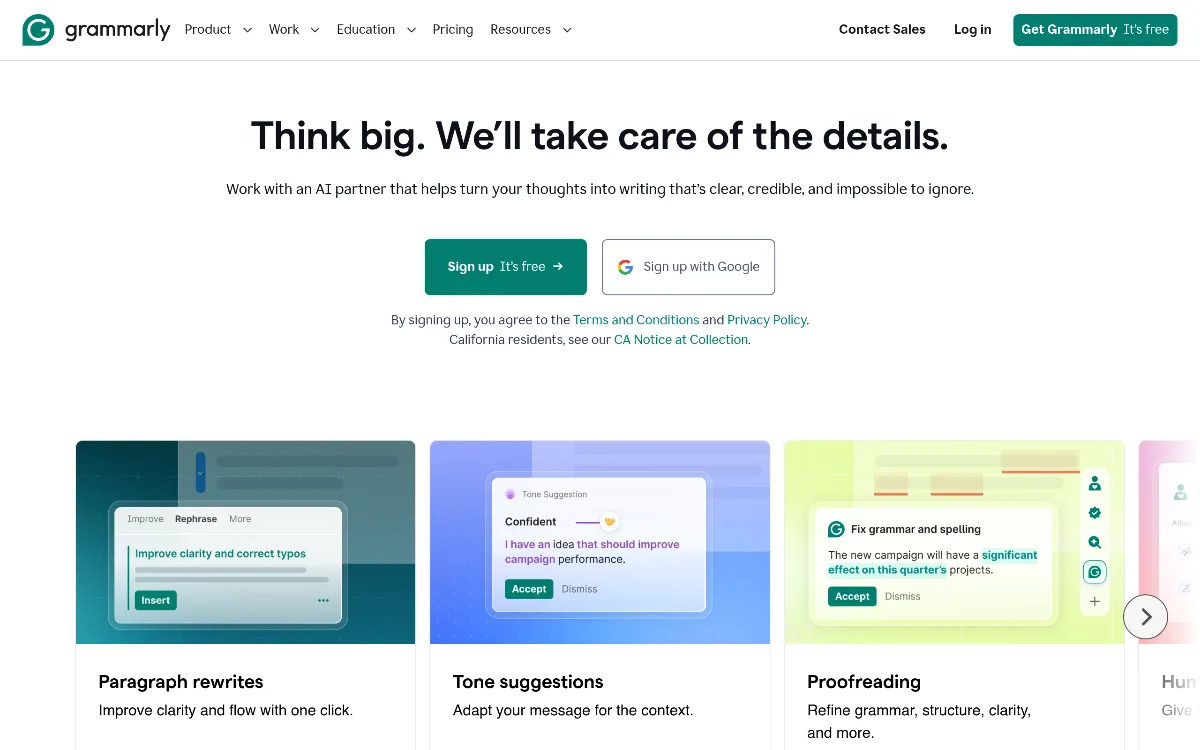
In its 2026 iteration, Grammarly does more than just fix mistakes; it anticipates your needs. It can detect the tone of your message—notifying you if you sound too aggressive or overly passive—and offers 'Full-Sentence Rewrites' to improve clarity instantly. With the inclusion of 1,000 AI prompts in the Pro plan, it also acts as a generative tool, helping users brainstorm ideas, outline documents, and even draft entire passages based on simple instructions. Whether you are typing in a browser extension, a dedicated Windows or Mac app, or using the Grammarly keyboard on your iPhone, the tool provides a consistent experience that ensures your writing is clear, credible, and impactful.
Key Strengths
Unmatched Platform Ubiquity: Grammarly is everywhere you are. Whether you are drafting a brief in Google Docs, sending a quick reply in Slack, or composing a formal letter in Microsoft Word, Grammarly’s integration is seamless. The desktop app for Windows and Mac ensures that even non-browser applications benefit from its AI-driven insights, making it the most versatile tool for a modern multi-app workflow.
Sophisticated Tone and Style Adjustments: Beyond basic grammar, Grammarly Pro excels at nuance. It identifies 'wordy' sentences and offers one-click conciseness suggestions. More importantly, its tone detection helps you navigate sensitive professional communications, ensuring your message lands exactly as intended—whether that is 'confident,' 'friendly,' or 'urgent.'
High-Quality Generative AI Integration: With the 2026 update, Grammarly has perfected the balance between human writing and AI assistance. The tool provides 1,000 AI prompts per month for Pro users, allowing for rapid drafting and ideation without leaving your document. This 'AI Partner' approach helps overcome writer's block by providing expert advice and text recommendations based on historical context and subject-matter expertise.
Comprehensive Plagiarism Detection: For students and content creators, the Pro plan’s plagiarism checker is a critical asset. It scans billions of web pages and ProQuest databases to ensure your work is original and properly cited, providing peace of mind in an era where AI-generated content is under constant scrutiny.
Real Use Cases
Marketing Team running campaigns: A marketing manager uses Grammarly Pro to maintain a consistent brand voice across social media posts, email newsletters, and ad copy. They rely on the tone detection feature to ensure that even under tight deadlines, the team’s output remains 'perfectly professional and convincing.'
Indie Developer shipping features: A solo developer uses the Grammarly browser extension to polish documentation and GitHub commit messages. By using the 'conciseness' suggestions, they ensure their technical explanations are clear and easy for other contributors to understand.
Executive handling high-stakes communication: A CEO uses Grammarly integrated with Superhuman Mail to draft sensitive internal memos. The 'Full-Sentence Rewrites' feature allows them to quickly turn rough notes into a polished, authoritative message that inspires confidence across the organization.
Student writing a thesis: A graduate student utilizes the plagiarism detection and vocabulary enhancement features to ensure their 50-page thesis meets academic standards. They use the AI prompts to help structure complex arguments and find the right academic tone for their research findings.
Freelance Writer managing multiple clients: A professional writer uses the multi-language keyboard and desktop app to toggle between different client projects, ensuring that their spelling and grammar remain flawless across various platforms and content types.
Best For
- Professional Communicators: Those who rely on email and documentation to get their jobs done and need to sound credible and clear.
- Non-Native English Speakers: Individuals looking for a 'safety net' that explains the 'why' behind grammar rules and suggests natural-sounding alternatives.
- Small to Medium Teams: Organizations (up to 149 seats on Pro) that want to standardize writing quality without the overhead of a full Enterprise contract.
- Content Creators: Bloggers and journalists who need a fast, reliable way to check for plagiarism and improve the flow of their long-form articles.
- Power Users of the Superhuman Suite: Anyone already invested in Superhuman Mail or Coda who wants a unified AI writing experience across their entire stack.
Who Should Look Elsewhere
Language Learners for Non-English Tongues: While the Grammarly keyboard supports multiple languages, the core 'Pro' features like tone adjustment and full-sentence rewrites are heavily optimized for English. If you primarily write in Spanish or German, a localized tool like LanguageTool might be more effective.
Budget-Conscious Casual Users: If you only need occasional spell-checking, the $144 annual price of Grammarly Pro is a significant investment. The free version—or even built-in browser spellcheckers—might suffice for basic needs.
Deep Research Specialists: For those who need a tool that can cite academic papers or perform deep research within the editor, specialized tools like Scrivener or specific AI research assistants might be a better fit than Grammarly’s general-purpose writing support.
Limitations
The 'Skill Gating' Effect: One of the most significant criticisms of Grammarly in 2026 is that it can act as a crutch. Users who rely on the tool for years for comma placement or sentence structure may find they haven't actually learned the rules themselves; they have simply had them applied for them.
Pricey for Monthly Users: At $30 per month, the monthly plan is significantly more expensive than the annual commitment. This makes it a 'commitment-heavy' tool for those who want the best features at a reasonable rate.
Advanced Features Gated: The Free version is quite limited compared to the Pro tier. Critical features like plagiarism detection, vocabulary enhancement, and full-sentence rewrites are strictly behind the paywall, which can be frustrating for casual users.
Hidden Enterprise Costs: For large organizations, the base license is only part of the story. Reports indicate that implementation, training, and premium support can add up to 220% to the initial cost, with implementation alone costing between $500 and $2,000 per user depending on the scale.
Pricing Overview
Grammarly has streamlined its 2026 pricing into three primary tiers, with the 'Premium' and 'Business' labels largely replaced by the 'Pro' and 'Enterprise' designations. Note that Grammarly is now part of the Superhuman Suite, which may influence bundle pricing for larger teams.
Free Plan ($0/month): Includes basic grammar, spelling, and punctuation checks, basic tone detection, and conciseness suggestions. It also includes 100 AI writing prompts per month.
Pro Plan (Monthly): $30 USD / member / month. Best for short-term projects or those who prefer not to commit to an annual contract.
Pro Plan (Quarterly): $60 USD / member / three months. A mid-tier option for those looking for a slight discount without a full year's commitment.
Pro Plan (Annual): $144 USD / member / year. This averages out to $12 USD per month, representing a 60% savings over the monthly billing cycle. This is the most popular plan for individuals.
Business/Enterprise: For small teams (3+ users), pricing typically ranges from $15 to $25 per user per month. Large-scale Enterprise plans are custom-priced, often landing between $189 and $243 per user per year after negotiated discounts. These plans include style guides, admin dashboards, and SAML SSO.
Pricing last verified: May 2026.
Our Assessment
Grammarly in 2026 is much more than the 'spellchecker' it was a decade ago. Our assessment is that it remains the gold standard for writing assistance due to its sheer reliability and the intelligence of its suggestions. While many LLMs can generate text, Grammarly is unique in its ability to refine text across every application you use. The integration into the Superhuman Suite has only strengthened its position, making it a central pillar of professional productivity.
From a value-for-money perspective, the $12/month annual Pro plan is an easy 'yes' for anyone whose career depends on written communication. The time saved on self-editing and the reduction in professional friction caused by typos easily justifies the $144 yearly cost. However, the $30 monthly price is harder to swallow and seems designed to push users toward the annual commitment.
The ease of use is where Grammarly truly shines. There is virtually no learning curve; you simply install the extension or app, and it begins working. The 'Pro' features, specifically the full-sentence rewrites, feel almost magical in how they can take a cluttered thought and make it 'impossible to ignore.' While we acknowledge the 'skill gating' limitation—where users might become overly dependent on the tool—the productivity gains are too significant to ignore. If you write professionally in 2026, Grammarly Pro is not just a luxury; it is a fundamental tool for your digital arsenal.
Top Alternatives
ProWritingAid — Choose ProWritingAid when you are writing long-form fiction and need deeper structural analysis and more detailed reports on your writing style.
LanguageTool — Choose LanguageTool when you require robust support for multiple languages beyond English and prefer an open-source alternative.
Hemingway Editor — Choose Hemingway when you want a simple, one-time-cost tool focused specifically on making your writing bold and clear without the generative AI fluff.
Frequently Asked Questions
Q: Is Grammarly Pro actually worth $144 a year?
For professional writers, the answer is a resounding yes. The $144 annual price (which breaks down to $12/month) pays for itself in the time saved on editing and the professional polish it adds to every email and document. If you only write casually, the free version is likely enough.
Q: What happened to Grammarly Premium and Grammarly Business?
In early 2026, Grammarly rebranded its tiers. 'Premium' is now 'Pro,' and 'Business' features for small teams have been folded into the Pro plan for up to 149 seats. Larger organizations now move directly to the 'Enterprise' tier for custom features and pricing.
Q: Does Grammarly work in Google Docs and Microsoft Word?
Yes, Grammarly has dedicated integrations for both. You can use the browser extension for Google Docs or the dedicated Grammarly for Microsoft Office plugin to get real-time suggestions directly within your word processor.
Q: Can I use Grammarly for free?
Yes, Grammarly offers a permanent free tier that includes basic grammar, spelling, and tone detection. It even includes 100 AI writing prompts per month in 2026, though it lacks the advanced rewriting and plagiarism features of the Pro plan.
Q: Is my data safe with Grammarly's AI?
Grammarly is trusted by over 50,000 organizations and maintains high security standards. While the AI analyzes your text to provide suggestions, the company has clear privacy policies regarding data usage, especially for Enterprise users who require SAML SSO and advanced security protocols.
Last reviewed: May 2026. Features and pricing are subject to change — always verify on the official website.
Screenshots
 1/1
1/1Key Features
Pricing Plans
Free
$0
Pro (Monthly)
$30/mo
Pro (Quarterly)
$60/3-months
Pro (Annual)
$144/year
Business/Enterprise
$15-$25/user/month
Top Grammarly Alternatives & Competitors
Explore the best similar tools and how they compare.
The AI operating system that turns GTM data into revenue-generating content.
The AI command center for marketing teams needing scale and brand consistency.
User Reviews
0 reviews · 0.0 avg rating
Be the first to review Grammarly
Help the community by sharing your honest experience with this tool.
Write a Review